Nobody can edit what an AI assistant says about a company, and there is no form at OpenAI, Google, Perplexity, or Anthropic where you type in the right answer. What you can do is find where the assistant got the wrong fact, correct it at that source, and make every page and listing about your company say the same thing. When the assistant looked the fact up on the web, the corrected answer shows up after the search engine behind the assistant has crawled the changed page. No assistant publishes how long that takes, and the only published figure is Google’s: about a day, and up to a week or two, for a page of your own after you ask Google to recrawl it. When it answered from memory, the change can take months, because the model’s memory only updates when the company that makes it retrains or replaces the model. The first job is checking whether the problem is real, because a single conversation does not show what most people see. This guide comes from findanseoagency.com, which publishes guides on SEO and AI search. Correcting the sources works because an assistant repeats what the pages and listings it reads say about your company.
Is it a real problem or one bad conversation?
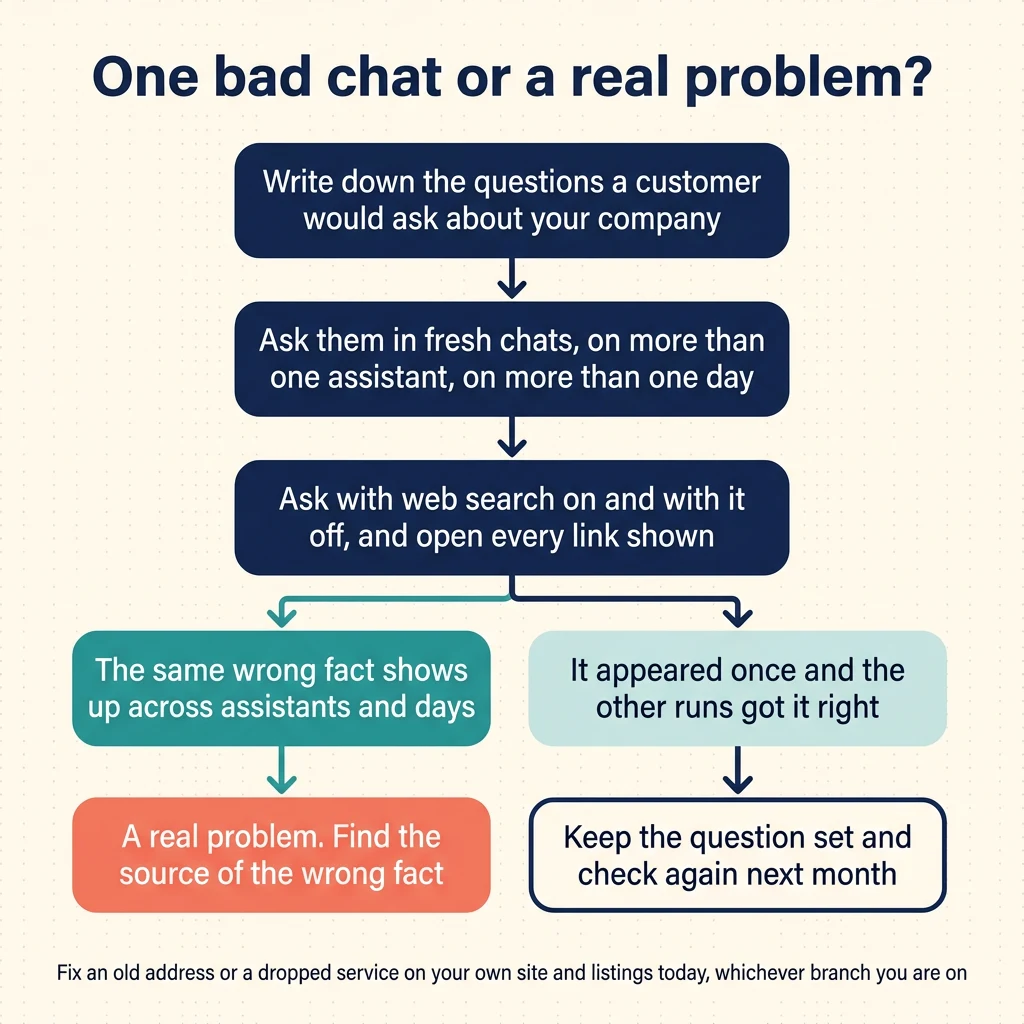
A wrong answer in one chat is not proof that everyone sees it. Answers change from one chat to the next and from one person to the next, so this site treats a single conversation as a reason to run a check rather than as proof of a problem. Write down five to 10 questions a customer would ask about your company, and ask them more than once, on more than one assistant, so you can see the pattern across the answers. If the same wrong fact appears across assistants and days, the problem is real. If it appeared once and the other runs got it right, keep the question set and check again next month. You do not have to finish the check before fixing the obvious mistakes. If your own website or your Google Business Profile still shows an old address or a service you dropped, correct it today. The check then shows what else needs fixing.
ChatGPT says different things to different people because it may answer from memory in one chat and from a web search in another, because two repeat answers to the same prompt share only about a fifth of their cited sources, and because it keeps a memory tied to each account that shapes what it tells that person. That is why the same wrong fact has to show up across the whole set of answers before you treat it as a real problem.
Ask the assistant where it got the fact, and open every link it shows. Treat each link as a page to check, because the link does not always tell you where the fact came from: Gemini’s own help says its listed sources may be content related to parts of the answer rather than the pages it used.
The check has five steps:
- Write down five to 10 questions a customer would ask about your company.
- Ask them in a fresh chat on at least two assistants, and ask them again on another day.
- Run each question with web search on and with it off, where the assistant lets you switch it.
- Record what each answer says and which sources it shows, every time.
- Open every link the assistant shows and check whether the page carries the wrong fact.
Where do AI assistants get facts about your business?
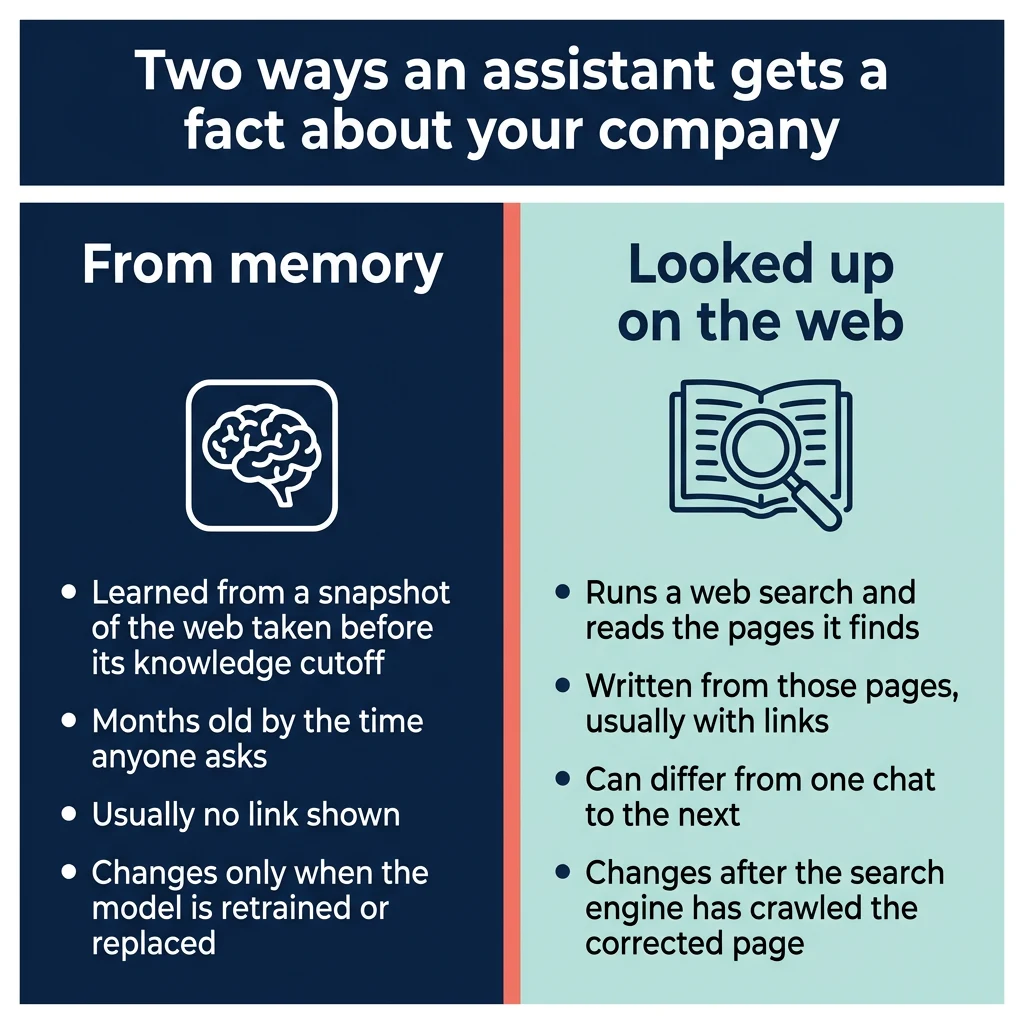
An AI assistant gets a fact about your company in one of two ways: from its memory, or by looking it up on the web. Memory means the model behind the assistant (a large language model, or LLM) learned from a snapshot of the web taken up to a fixed date, called its knowledge cutoff. By the time anyone uses the model, that snapshot is months old: as of September 2026, OpenAI, Google, and Anthropic all list knowledge cutoffs in the first half of 2026 for their newest models. For a smaller company, the fact in a memory answer can be even older than the cutoff, because the page the model learned it from may already have been out of date when the snapshot was taken.
The second way is looking it up. The assistant runs a web search, reads the pages it finds, and writes an answer from them, usually with links. Perplexity searches the web for every answer. ChatGPT, Claude, and Copilot search when web search is switched on, and ChatGPT also decides on its own to search for some questions. Google says some of Gemini’s answers are based on Google Search results, and Google’s AI Overviews and AI Mode use the same index as regular Google results.
The assistants often cite pages on other sites for company facts rather than the company’s own site. On ChatGPT, Google’s AI Overviews, and Perplexity, the most cited domains include Wikipedia, Reddit, YouTube, LinkedIn, and review sites. Also check the other places that state facts about your company, since any of them can carry the wrong fact: your own website, your Google Business Profile, Wikidata, Crunchbase, directories, Quora threads, old PDFs, and old job posts. How the assistants choose which pages to cite is covered in the guide to getting cited by ChatGPT and other AI search engines.
Which kind of wrong is it?
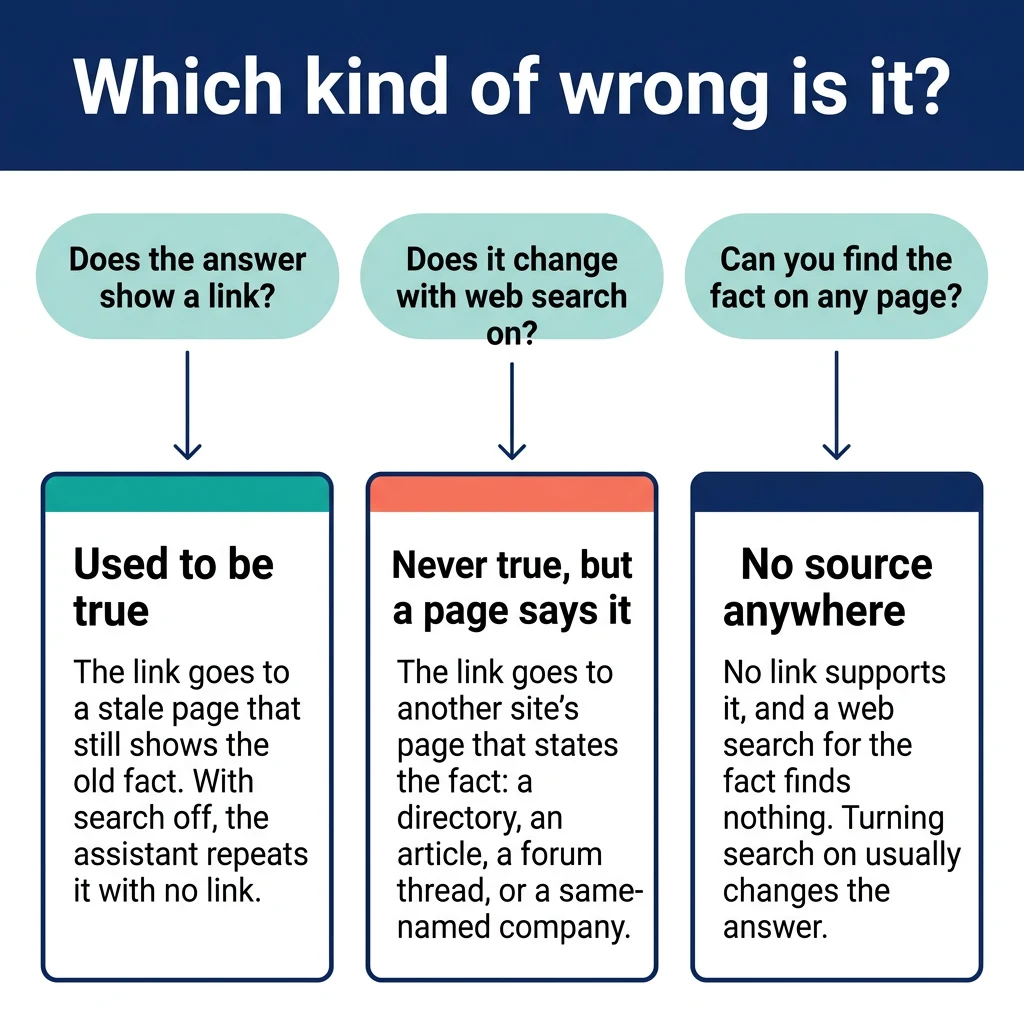
Once you know the problem is real, and whether the assistant looked the fact up or remembered it, sort the wrong fact into one of three types. Each type has a different fix and a different timeline. The first type is a fact that used to be true, such as an old address, a former owner, or a price from two years ago; the assistant either read it on a page nobody updated or learned it in training. The second type is a fact that was never true but that some page states: a directory entry, a comparison article, a forum thread, or the website of a company with a similar name. The third type is a fact with no source anywhere; the assistant made it up. Three checks tell the types apart. Does the answer show a link? Does the answer change when you turn web search on? Can you find the fact on any page at all?
| Type of wrong | What it looks like | How to tell | What fixes it | How long it takes |
|---|---|---|---|---|
| Used to be true | An old address, a former owner, a discontinued service, an old price | With search on, the answer links to a stale page that still shows the old fact. With search off, the assistant repeats it with no link, which means it remembers it from training. | Update, remove, or redirect the stale page, and state the current fact with a date on your own pages | For looked-up answers, the wait is the search engine’s recrawl of the changed page, and no assistant publishes how long that is; Google’s published figure is about a day, and up to two weeks, for a page of your own after you request it. For memory answers, months, until the model is retrained or replaced |
| Never true, but a page says it | A service you never offered, a wrong founder, another company’s city or owner attached to you | The shown link goes to a third-party page (a directory, an article, a forum thread, or a same-named company’s site) that states the fact | Get that page corrected or claimed, and state the correct fact on your own pages and on the sources the assistants already cite | Once the page changes, the wait is the search engine’s recrawl of that page, and no assistant publishes how long that is; Google says a recrawl nobody has requested can take several days to several months. Longer when the publisher does not respond |
| No source anywhere | A detail nobody has published, often plausible-sounding | No link supports it, and a web search for the fact finds nothing. Turning search on usually changes the answer. | Publish the correct fact plainly on your own pages so a search finds it | For looked-up answers, the wait is the search engine’s recrawl of your new page, and no assistant publishes how long that is; Google’s published figure is about a day, and up to two weeks, after you request it. For memory answers, months, because there is no source page to correct and the memory changes only when the model is retrained or replaced |
One form of the second type is a mix-up with a company that shares your name or part of it. The assistant reads that company’s page and attaches its owner, city, or services to you, and the fix is making sure every profile about your company includes the details that tell the two apart.
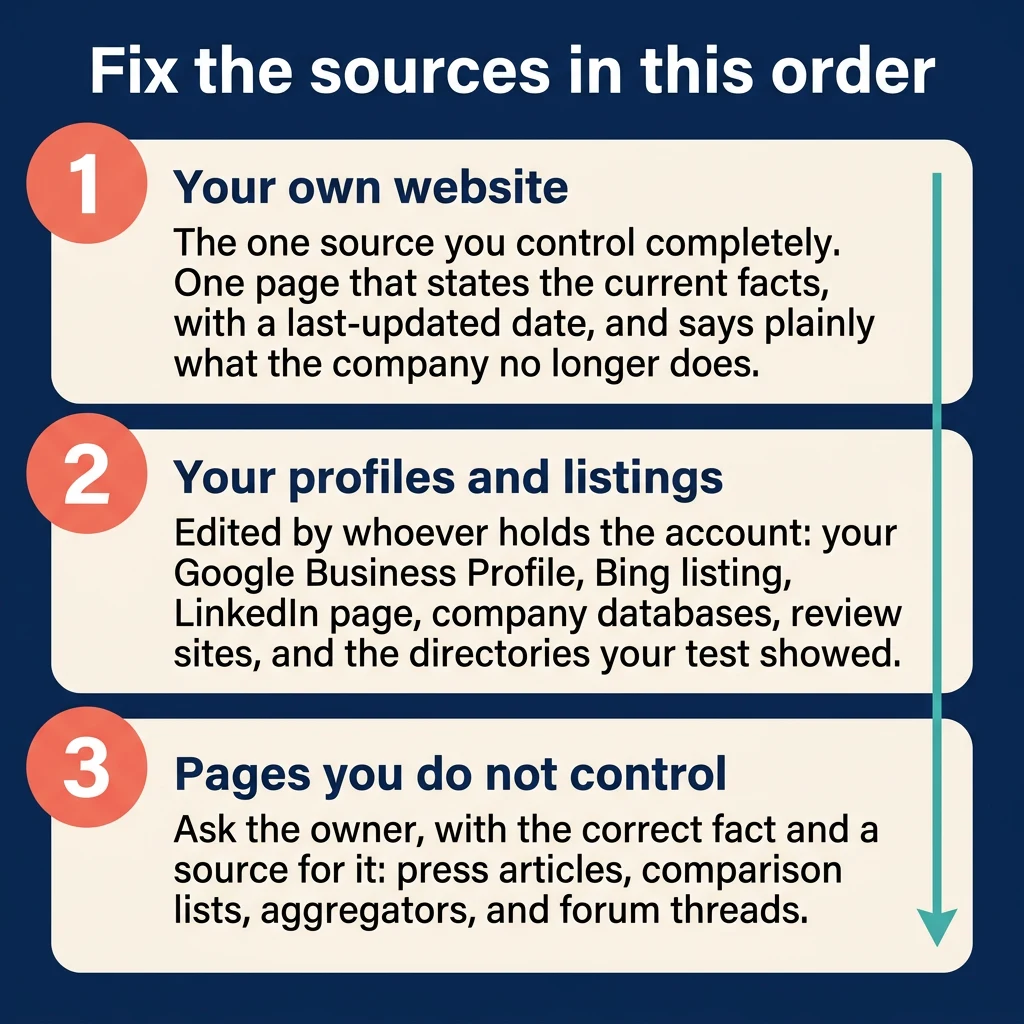
Step 1: Fix your own website first
Your own website is the one source you control completely, so it comes first. The goal is one page that states the current facts plainly and shows the date it was last updated. The facts are the company’s name, what it does, where it is, who runs it, what it charges if you publish prices, and what it no longer does. Saying what you no longer do in plain words works better than leaving the old page up, because an assistant that finds a page about a service you dropped has no way to know it was dropped.
- Publish one page that states the current facts, with a “last updated” date on it.
- State plainly on that page what the company no longer does, with the year it stopped.
- Put the same facts, in the same wording, on the home, about, and contact pages.
- Remove or update pages about discontinued services or closed locations, and redirect the old address to the page that explains the change.
- If your site has structured data (hidden code that gives search engines the company’s name, website address, logo, address, phone number, and founding date), make sure it matches what the visible page says, because Google’s rule is that structured data must be a true representation of the page content. If someone else manages your site, ask them to check it.
- Make sure the assistants’ crawlers can reach the pages; the guide to getting cited by AI search engines covers how.
Step 2: Fix your profiles and listings
Your profiles and listings are the next set of sources, and most of them can be edited by whoever holds the account.
- Google Business Profile. Open the profile, choose “Edit profile”, and correct the name, address, hours, phone numbers, website, and services. Google reviews changes before they go live and does not say how long that takes. On the same “Edit profile” screen, where Google offers it, Google can also draft the profile description for you, written by AI from the information on the profile and other sources such as your website. Read that draft for accuracy and edit it before you save it, because Google says the feature writes creative text.
- Bing Places. Copilot bases its answers on Bing search results, so the Bing listing matters, and so does what Bing’s search results show for your site. Sign in at Bing Places for Business, and if your Google Business Profile is already verified you can import it and keep the two in sync.
- LinkedIn company page. Only a super admin of the page can edit it. From the super admin view, choose “Edit page” and update the description, website, and About details. Every page has at least one super admin, and the role goes to whoever created the page.
- Crunchbase and similar company databases. On Crunchbase, any registered user can edit a profile from the “Actions” menu, and fields with a lock icon are limited to verified employees. Do the same on any other database where the company has a profile.
- Wikipedia and Wikidata. If there is a Wikipedia article about the company, do not edit it yourself; Wikipedia strongly discourages subjects and their employees from editing articles about themselves. Post the correction on the article’s talk page with a source, using the Edit COI template or the Edit Request Wizard, and expect to wait, because volunteers handle the requests. Wikidata is different: anyone can edit an item, with a source.
- Review sites your industry uses. Correct the business details: address, hours, services, and website. The reviews on those sites are a separate subject, and fixing a wrong business detail does not depend on them.
- Directories the assistants cited in your test. Claim each listing and fix it, starting with the ones that showed up in your answers.
If the wrong answer came from a mix-up with a similarly named company, add the details that tell the two apart to every profile: the city, the founding year, and what the company does.
Step 3: Fix wrong facts on pages you do not control
Some of the pages an assistant reads belong to someone else, and the only way to change them is to ask the owner. Send the request with the correct fact and a source for it, such as your facts page, so the person on the other end can check it in a minute.
- Press and blog articles. Ask the publisher for a correction or an update note at the top of the article, and include the source for the correct fact.
- Directories and aggregators that scraped stale data. Claim the listing if the site allows it, and request removal if it does not.
- Comparison and “best of” articles. Send the author a correction request with the fact and the source.
- Forum threads. Reply as the business, once, with the facts. Do not use a fake account or a friend’s account.
Some pages will not change, and the correction can still work without them. The assistants read many sources for a company, so when most of those sources agree, the assistants see the correct fact on most of the pages they read and the old fact on one. Publish the correct fact on the sources the assistants already cite for your company, and make sure your own pages state it. That is also why this site treats mentions on the sources AI already cites (directories, “best of” lists, review sites, and discussion threads) as more important for showing up in AI answers than the number of links pointing at a website, and the same holds for a correction: the fact the assistants see most often is the one they repeat.
Can you report the wrong answer to OpenAI, Google, Perplexity, or Anthropic?
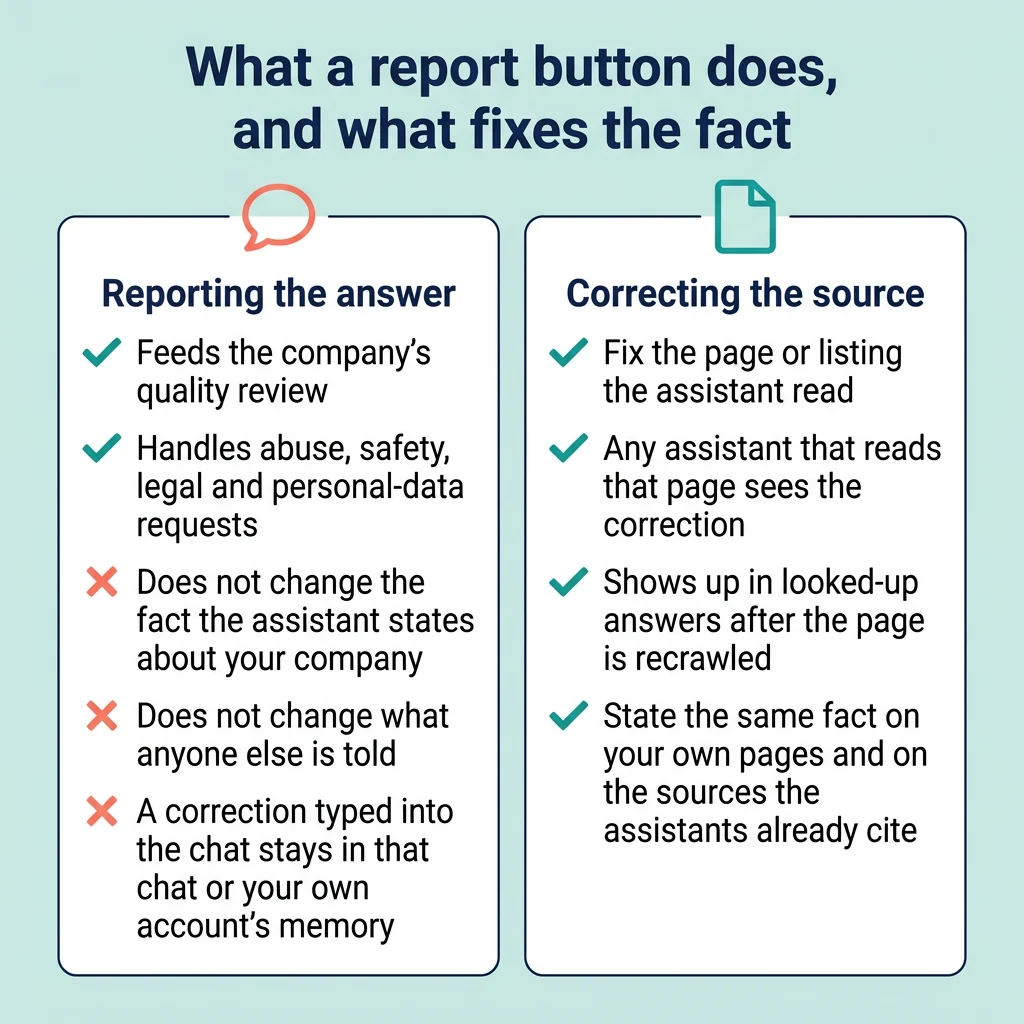
Yes, every assistant has a feedback or report route, and none of them lets a business correct a fact about itself. The thumbs down and report forms feed quality review and handle abuse, safety, legal, and personal-data requests. None of the companies that make the assistants (OpenAI, Google, Perplexity, Anthropic, and Microsoft, which makes Copilot) publishes a route for a business to correct a fact inside the assistant’s answers. Google’s Business Profile editing corrects the profile itself, and Google does not say that it changes what Gemini, AI Overviews, or AI Mode answer. A report can affect the page the assistant read, but not the fact itself. OpenAI says reported sources may be reviewed by its quality team and filtered from future answers, so a report that names the stale page may help keep that page out of ChatGPT’s answers. Getting the correct fact in is a separate job, and it happens on the pages and listings the assistant reads. Typing the correction into the chat changes little: it lasts for that conversation, or for your own account’s memory where the assistant keeps one, and nobody else’s answer changes. Reporting is still worth a minute after the fixes are in, but nothing in your timeline should depend on it.
| Assistant | How to report | What the report does | What it cannot do |
|---|---|---|---|
| ChatGPT | Thumbs down under the reply, then “Select an issue”; or OpenAI’s report form for content that may break its terms or the law | Feeds quality review; OpenAI says reported sources may be filtered from future answers | It does not change the fact ChatGPT states about your company; a correction typed into the chat stays in that chat or your account’s memory |
| Gemini and AI Overviews | “Bad response” under a Gemini reply; thumbs down on an AI Overview, then “Report a problem” | Goes to Google as feedback to make the products more accurate | No editorial correction; if a stale page of yours shows up in Google’s results, you update it and then ask Google to recrawl it or remove it through Search Console |
| Perplexity | Flag icon below the answer, or a support ticket with the query link, the error, and the expected answer | Sent to Perplexity as a report of an incorrect or inaccurate answer; Perplexity does not say what it does with the report | Does not edit Perplexity’s answer; the next answer comes from a fresh web search |
| Claude | Thumbs down on the response, or an email to Anthropic support | Feedback on incorrect or misleading responses | No route for correcting company facts; Anthropic says Claude may not have been trained on the most up-to-date information, and that training data changes only when the model is retrained or replaced |
| Copilot | In the version of the Copilot app before the August 18, 2026 update, the flag icon below the response (on mobile, a long press on the response, then “Report”); Microsoft has not yet documented a report control for the updated app; in Copilot Chat at work, thumbs down and describe the issue | Feedback to Microsoft | Does not change what Bing’s index says about your company, which is what Copilot answers from |
There are removal routes for information about a person, such as OpenAI’s privacy portal and Google’s “Results about you” tool, and they are a different process from correcting company facts.
How long does it take for the correction to show up?
A looked-up answer changes when the source page changes and the assistant’s search index picks up the new version. No assistant publishes how often its search index refreshes, so there is no published figure for how long that wait is. The only published numbers are Google’s, and they cover Google’s own crawling: when nobody has asked for a recrawl, Google says crawling a page again can take anywhere from several days to several months. You can ask the search engines to visit your own pages again sooner (a recrawl). In Google Search Console, open URL Inspection and choose “Request indexing”, which Google says typically takes about a day but can take a week or two; repeat requests do not make it faster. In Bing Webmaster Tools, submit the changed URLs.
A memory answer changes only when the model is retrained or replaced, and no request to any company speeds that up. You can tell when a model has changed. The makers announce new models. Claude and Gemini also show the name of the model in use in the chat box. ChatGPT shows effort levels (Instant, Medium, High, and Extra High) and Pro rather than a model name. The model behind one of those labels can differ by plan. Copilot shows modes such as Smart and Think Deeper, and Perplexity’s default mode shows no model name. For those three, the maker’s announcement is the signal to watch. When a new model is announced or a new name appears in the chat, rerun your questions with web search off. If your test showed the wrong fact with search off and no link, plan for months. Put the effort into the pages in the meantime, so the looked-up answers are right now and the next model learns the right fact when it is trained.
| What you fixed | Who controls the change | Typical time | How to check |
|---|---|---|---|
| A page on your own site | You, then the search index recrawl | About a day, and up to two weeks, for Google to index the page after you request it; no assistant publishes how long after that its answers change | Rerun your question set with web search on and open the links shown |
| A listing or profile | The platform’s review process (Google reviews Business Profile edits before they go live; Wikipedia requests wait for volunteers) | No platform publishes how long its review takes; Wikipedia tells article subjects to check back periodically and be patient | Check the listing itself, then rerun the questions that cited it |
| A third-party page | The publisher, then the search index recrawl | Depends on the publisher; after the page changes, Google says a recrawl nobody has requested can take several days to several months, and no assistant publishes how long after that its answers change | Rerun the questions that cited the page and see whether it still appears |
| Model memory | The model maker, at the next model release | Months; no request speeds it up | Rerun the questions, with web search off where the assistant lets you switch it off, whenever the maker announces a new model or, on Claude and Gemini, the chat box shows a new model name |
What to do while you wait
Keep the same set of questions you used for the first check and rerun it monthly, noting the answers and the sources each time. Judge the fix by comparing the whole set of answers from before the fix with the whole set after it. One changed answer does not show the fix worked, because the same question cites different sources much of the time even when nothing about your company has changed.
- Keep the facts page current, and update the date whenever a fact changes.
- Give sales and support the correct wording, so a prospect who quotes the wrong answer hears the correction and where to find it.
- Do not pay for bulk listings or links to try to force the change. This site does not recommend buying links in bulk, and for a correction it does nothing: the assistants repeat what the sources they already read say, and a batch of new listings or links does not correct those sources. Fixing the sources the assistants already read is what makes a correction work. Those sources include a listing on a directory that showed up in your test, whether the listing is free or paid.
Frequently asked questions
Can I contact OpenAI or Google directly to correct wrong information about my company?
You can send feedback, and both companies read it, but neither one corrects company facts on request. OpenAI’s routes are the thumbs down, a report form for content that may break its terms or the law, and a privacy portal for personal data. Google’s are the feedback buttons under Gemini replies and AI Overviews. A company fact gets fixed at the page the assistant read it from.
Why does ChatGPT say different things to different people?
ChatGPT may answer from memory for one person and from a web search for another, and the two paths read different material. It also varies from one chat to the next: two repeat answers to the same prompt share only about a fifth of their cited sources. And ChatGPT keeps a memory tied to each account, so what a person told it before shapes what it tells them now.
What if my information is correct in Google but ChatGPT still gets it wrong?
ChatGPT either remembers the old fact from training or read it on a page other than the ones Google shows. Ask the same question with web search on and off. If the wrong fact appears with search off and no link, it is memory, and it changes only when the model is retrained or replaced. If it appears with search on, open the links shown and fix the page that carries the old fact.
Why does Gemini cite competitor pages about my brand?
Gemini cites the pages that answered the question it ran, and if a competitor’s comparison page or a directory stated the fact more plainly than your site did, that page is what it shows. On ChatGPT, Google’s AI Overviews, and Perplexity, the most cited domains are third-party sites such as Wikipedia, Reddit, YouTube, LinkedIn, and review sites. Gemini’s shown sources can also be pages related to the answer rather than the ones it used, so open each one and check. Put the fact on your own pages in plain words and make sure those pages can be crawled, and Gemini has a better page to cite.
Should I worry about wrong information if we are a small local business?
Yes, when the wrong fact is one a customer acts on: the address, the hours, the phone number, or a service you no longer offer. A customer who reads the old address goes to the wrong place, and a customer who reads about a dropped service asks for something you no longer offer. The steps are the same as for a larger company, and there are fewer of them, because a local business has fewer pages and listings to correct: the website, the Google Business Profile, the Bing listing, and the directories your test showed.
Start with the check
The next step is the check: run the question set, work out which kind of wrong it is, and fix the pages and listings you control. The guide to getting cited by ChatGPT and other AI search engines covers how to make your own pages the ones the assistants cite, and the AI search hub collects the site’s other guides on AI search. If you would rather have an agency run the check and the fixes, how to choose an SEO agency for AI search lists the questions to ask before you sign.