
Yes, a small local or service business can do most of its own SEO without an agency, using free tools and a few hours a week. The work that usually needs help is technical problems that require code, earning links and mentions on many other websites, and getting your business named in AI answers (for example, when someone asks ChatGPT to recommend a plumber) across many platforms at once. The hard part is doing it every week. It takes a few hours a week for months, and the results come sooner when the work is steady.
Google says the same thing on its own page about hiring SEO help: “If you run a small local business, you can probably do much of the work yourself.” findanseoagency.com publishes guides written for the business that is paying for SEO or AI search help, and this one is for the owner or in-house generalist who has been told to handle SEO with little or no budget.
If you are still deciding whether SEO is worth doing at all, the guide to whether SEO is worth it covers that question. If you run an online store, a software company, a large company site, or a website that earns money from traffic, the answer is different: the work is larger and usually more technical than one person can cover, and this guide does not cover those businesses.
What SEO can you do yourself?
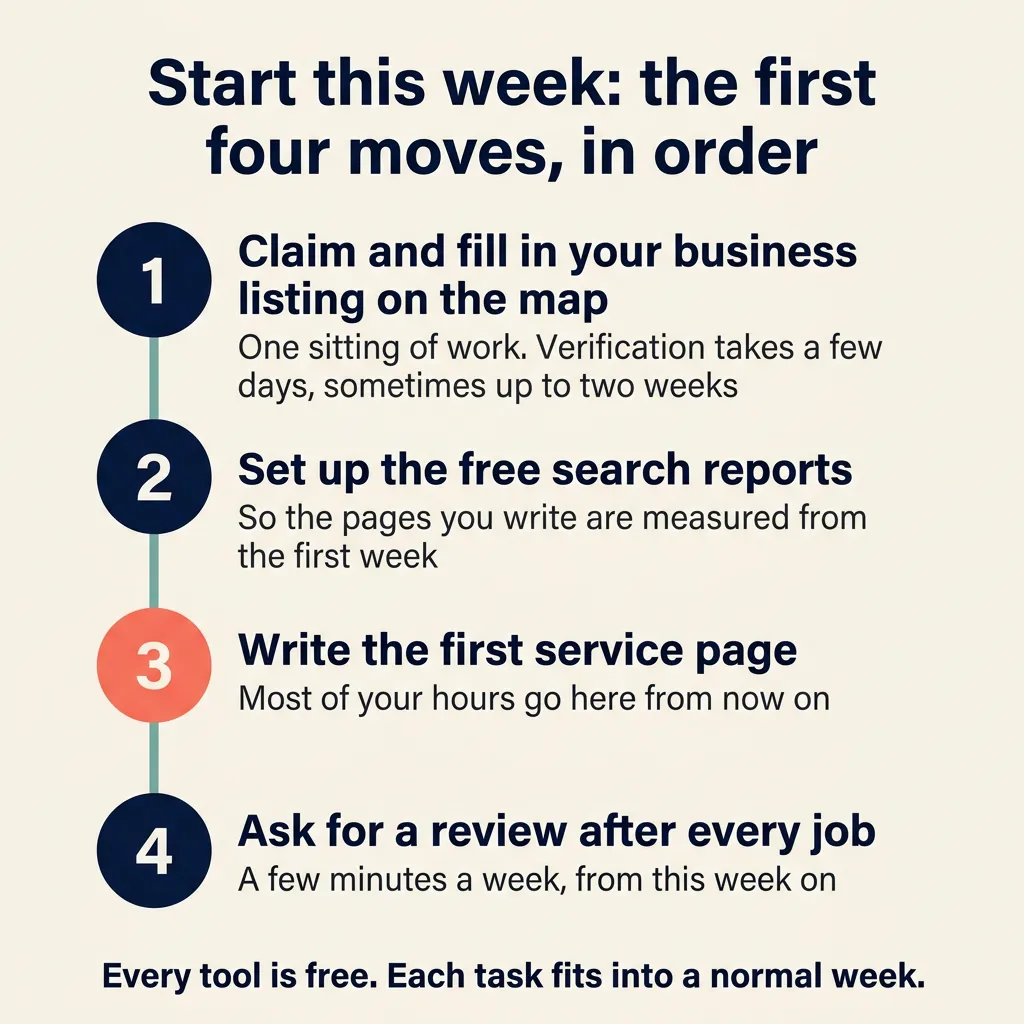
Start with the Google Business Profile, because claiming it and filling it in is one sitting’s work. Google then takes a few days, and sometimes up to two weeks, to verify it. Set up the free tools next, so the pages you write get measured from the first week. Then write the first service page, and ask for a review after every job from this week on. The profile comes first because it is quick, but the pages that answer buyers’ questions bring in the most customers over time, and the profile, reviews, and the settings on each page support those pages. Every tool in this list is free, and each task fits into a normal week.
Claim and complete your Google Business Profile
Google Business Profile is the listing that shows on Google Maps and in the box of local businesses near the top of a search, and creating one is free. Google ranks local businesses on three things: how well the profile matches what the person searched for, how far the business is from the searcher, and how well known the business is. You cannot change the distance, but you can make the profile match more searches by filling it in completely. Google says businesses with complete and accurate information are more likely to show up in local results.
- Claim the profile and verify it. Verification tells Google you are allowed to represent the business, and verified profiles are more likely to show.
- Choose the primary category that matches your main service, and add secondary categories for the rest of what you do.
- List every service you offer, with a short description of each one.
- Set your hours, including holiday hours, and keep them right.
- Add photos of the building, the team, and finished work, and add new ones a few times a year.
- Open the profile once a month and fix anything that has changed.
Posting updates on the profile (short notices and offers that a business can publish on its listing) is not in this list. This site’s position is that those posts have no measurable effect on where a business ranks or on whether AI assistants name it.
Ask for reviews every week and reply to every one
Reviews affect how well known Google thinks your business is, which is one of its three local ranking factors. Google says more reviews and positive ratings can help your local ranking, and that replying to reviews helps your business stand out. This site’s position is that a steady pace of new reviews matters more than the total count. A business that gets a few new reviews every month looks more active than one with a large number of reviews that stopped a year ago.
- Get your Google review link or QR code from the profile.
- Ask every happy customer when the job is done, and send the link the same day.
- Reply to every review, including the bad ones, in a plain and polite tone.
- Never offer a discount, gift, or free service for a review. Google treats that as fake and misleading content and prohibits it.
Write one page for each service and each area you serve
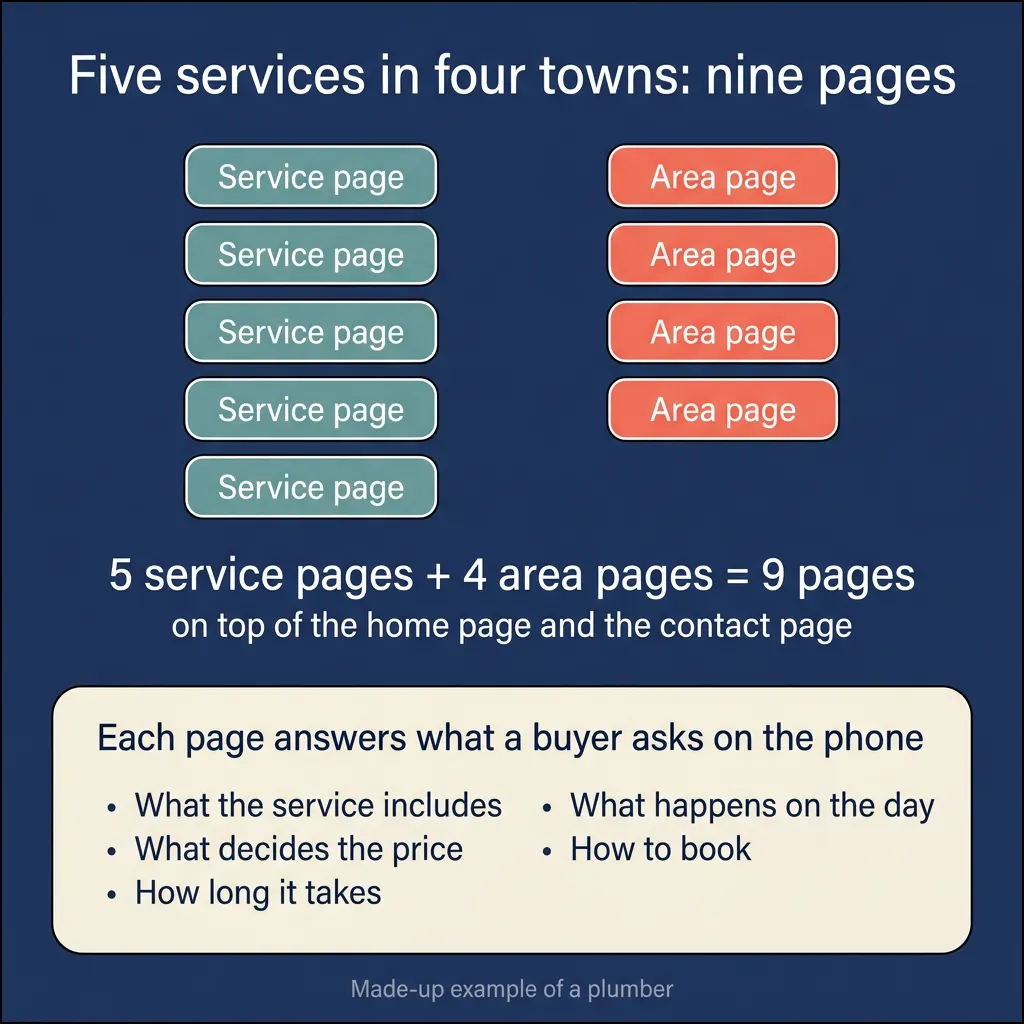
Most of your SEO hours should go to writing pages, because Google and AI assistants read your pages to decide which searches to show your business for. A page that answers what a buyer wants to know before they call gives them a reason to show it. Write one page for each main service and one page for each town or area you serve. As a made-up example, a plumber who offers five services in four towns ends up with five service pages and four area pages, nine in all, on top of the home page and the contact page. Each page answers the questions a buyer asks on the phone: what the service includes, what decides the price, how long it takes, what happens on the day, and how to book. Start with the pages for people who are close to buying, such as a service page with prices, before you write general articles.
On most website builders, adding a page is something the owner can do from a menu without a developer, and the title, description, heading, and web address of the page are fields in that page’s settings. The field names differ from one builder to the next, and the builder’s own help pages show where they are. If your site was custom-built and nobody at the business can log in and edit it, arrange that access first, because writing pages and fixing their settings both depend on it.
You do not need a keyword tool to choose what to write about. Use the words your customers use when they call. After a few weeks, open the Performance report in Google Search Console, the free Google tool that shows which searches your site appeared for, and read the queries people typed to find you. Any query you have no page for is a page to write next.
Get the on-page basics right on every page
Once a page is written, a few small settings tell Google what the page is about. Each one is a field in the page settings of most website builders, and each takes a few minutes to fill in.
- Title. Every page gets its own title. Google uses it as the headline of the search result, so it should describe the page in plain words and include the service and the town. Do not repeat the same title across pages, and do not fill it with a list of keywords.
- Meta description. A one- or two-sentence summary of the page. Google may use the description as the text under the headline when the description sums up the page better than the page’s own text does, so write a specific one for each page.
- One clear heading at the top of the page that says what the page is about, in the same words as the title.
- Plain URLs that say what the page is, such as yoursite.com/water-heater-repair rather than a string of numbers.
- Links between related pages, such as the water heater page linking to the main plumbing page and to the page for the town it serves.
- Your business name, address, and phone number written the same way on every page and on every listing, so Google can match them all to the same business.
Set up the free tools and look at them monthly
- Google Search Console is a free service from Google that shows how your site does in Google Search. The Performance report shows the queries people searched, how many times your pages appeared (impressions), and how many clicks you got. The Page indexing report shows which pages Google has found and included, and which it could not, so you can see whether a page you wrote is missing.
- The Business Profile performance view shows the search terms people used to find your profile and how many of them called, asked for directions, or clicked through to your website.
- Google Analytics shows what visitors do once they are on your site: which page they came in on, where they went, and whether they filled in a form.
- Bing Webmaster Tools is free and quick to set up, and it is worth doing because Bing says its index powers AI tools including ChatGPT, along with Yahoo and DuckDuckGo. Its search performance report works much like the one in Search Console.
Check what AI assistants say about your business, for free
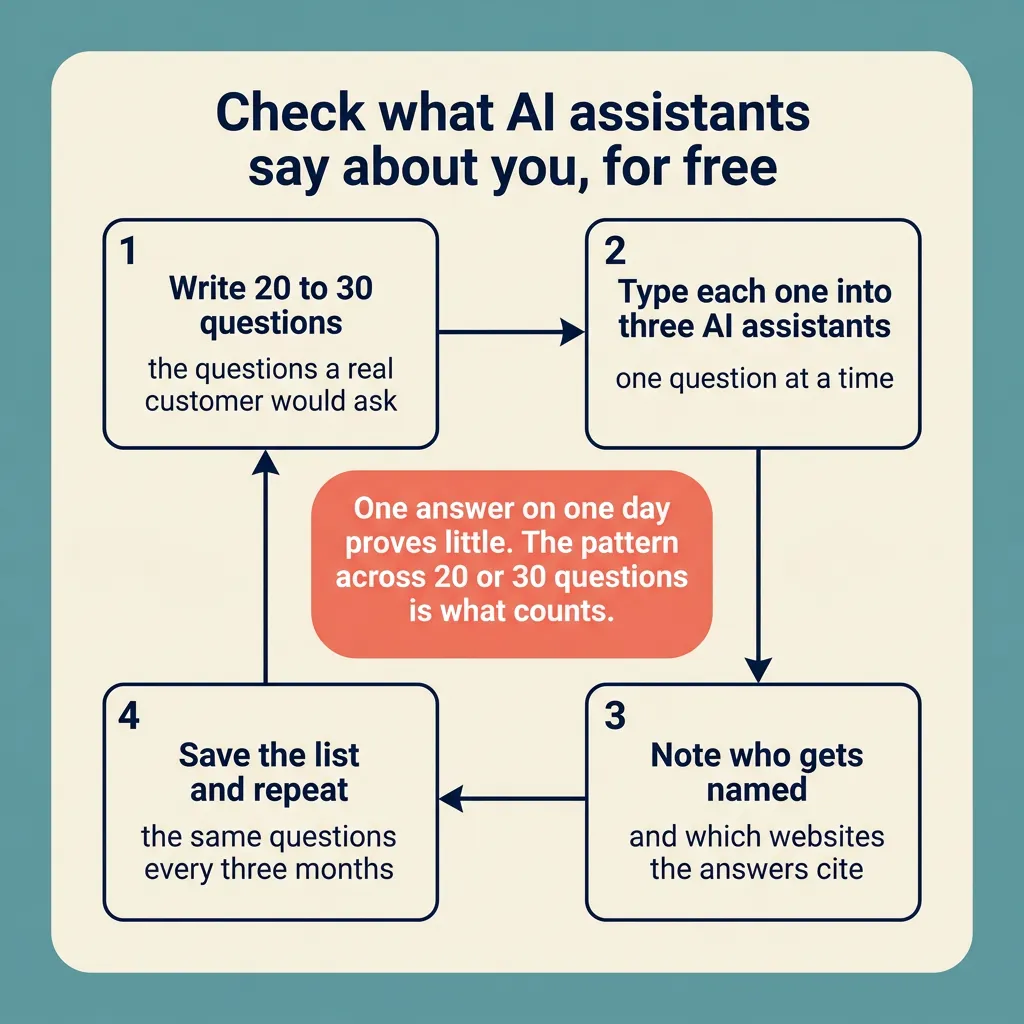
You can check your AI search visibility without a tool. Write 20 to 30 questions a real customer would ask, such as “who is a good emergency plumber in [your town]” or “how much does roof repair cost in [your town]”. Type each one into ChatGPT, AI Mode (Google’s own AI answer), and Perplexity. Note which businesses get named and which websites the answers cite, such as directories, review sites, or local news. Save the list and repeat the same questions every three months so you can see what changed.
One answer on one day proves little, because answers vary from one run to the next. The pattern across 20 or 30 questions is what counts. The sites that get cited again and again are where your business needs to be listed or mentioned, and the guide to earning AI citations covers what to do with that list.
How much time does DIY SEO take?
Plan on a setup period of a few weeks, then a weekly rhythm that does not stop. The setup covers the profile, the free tools, the on-page fixes, and the first few pages. After setup, most of the hours go to writing pages, because each service and area page takes real thought and a couple of hours to write well, and a business with five services in four areas has nine of them to write. Reviews and profile upkeep take much less: a few minutes to send review links after each job, a few minutes to reply, and a monthly check of hours and photos. The monthly look at the reports takes less than an hour.
The rhythm has to fit inside the time you really have. In a 2025 survey of small businesses in four countries including the US, 42% said they have less than one hour a day for all of their marketing. If that is you, put the hours into the pages first, because a page keeps working after it is published, and spend only a few minutes a week on the profile and the reviews.
How long until DIY SEO shows results?
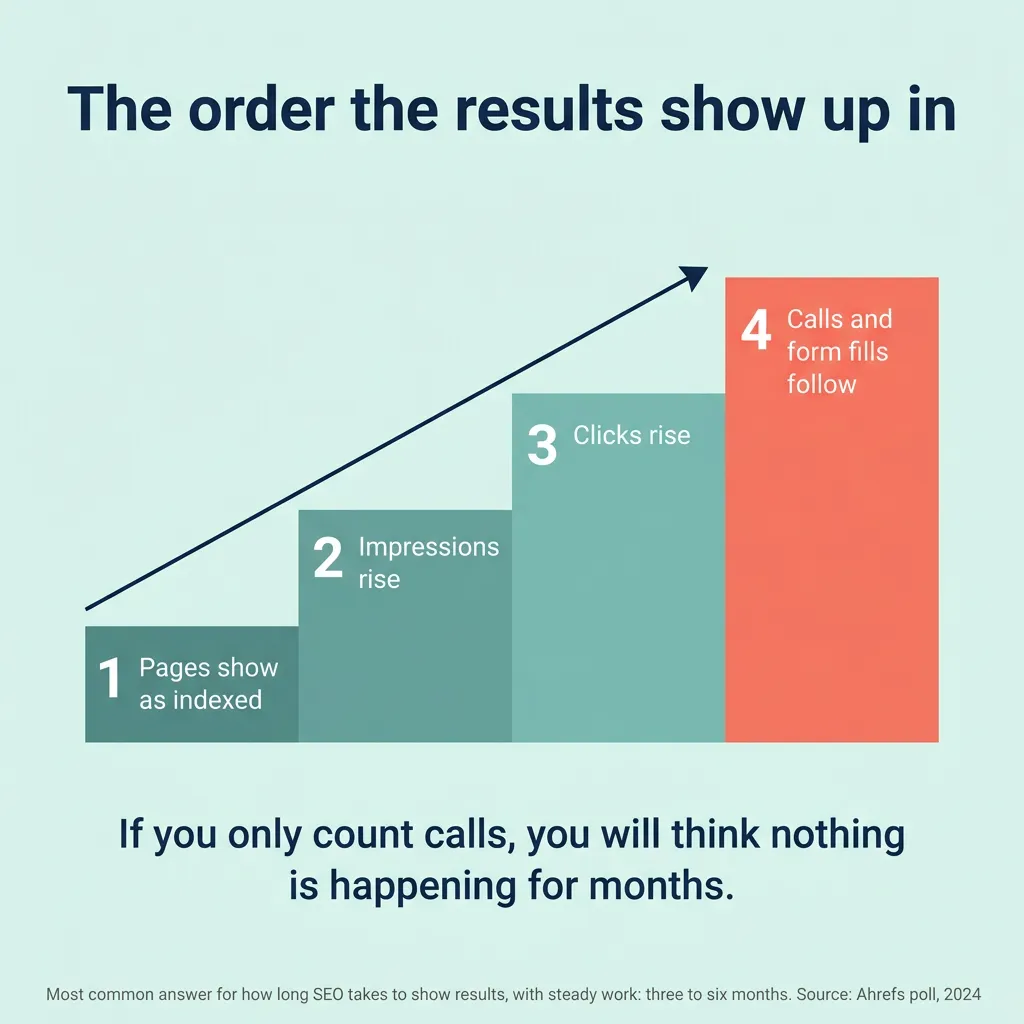
Three to six months is the most common answer when Ahrefs polled people on LinkedIn and X about how long SEO takes to show results, and that answer assumes steady work, so a month with nothing done pushes the date back. Google’s own starter guide says some changes take effect in a few hours and others take several months.
The first signs show up in Search Console before they show up as calls. New pages appear in the Page indexing report first. Then impressions rise as those pages start showing for more queries, then clicks rise, and only after that do calls and form fills follow. If you only count calls, you will think nothing is happening for months while the early signs are already showing in Search Console.
What can’t you realistically do yourself?
Some work needs skill or time that one person running a business rarely has. It is better to know now which tasks those are than to find out after six months.
Technical problems that need code
Site moves, redesigns, and indexing or speed problems that need code changes are the work where a do-it-yourself mistake costs the most. Moving a site to a new domain or changing every web address is risky because Google has to find and reindex every page under its new address. Each old address also has to forward visitors and Google to the new one, and that forwarding is called a redirect. Google says a small to medium-sized site can take a few weeks for most pages to move, and a redirect that points to the wrong place during those weeks costs that page its ranking. Google’s own advice on hiring an SEO says “a great time to hire is when you’re considering a site redesign (the earlier, the better), or planning to launch a new site.”
Hiring help also makes sense for a page that Search Console says it cannot index when you cannot see why, and for a site that loads slowly when the fix is in the site’s theme or its server rather than in a setting you can reach.
Earning links and mentions at scale
Links from other websites and mentions of your business on other sites still matter, and earning more than a handful takes time that one person rarely has. A few come without effort: your chamber of commerce, a supplier, a local news story, a directory listing. Getting dozens more takes steady outreach, which means hours every week writing to editors and site owners.
Buying them is not a shortcut. Google’s spam policies count paying for links, trading goods or services for links, or sending a free product in exchange for a write-up with a link as link spam, and a site caught doing it can be removed from Google’s results.
For being named in AI answers, links matter less than mentions do. Across the brands Ahrefs studied, how often a brand was mentioned on the web tracked closely with how often it showed up in ChatGPT, AI Mode, and AI Overviews, while backlink counts showed only a very weak relationship. Earning mentions on the right sites takes the same steady outreach as earning links, and that is why one person rarely has the hours for it.
AI search visibility across many platforms
The 20-to-30-question check shows which businesses and sites AI assistants name for your services. Acting on what it shows is the part one person rarely has time for. Getting your business mentioned and recommended on the sources those assistants cite means slow outreach to many sites, and the sources that matter differ by industry and by question, so the list has to be worked out for your business. Tracking many questions across ChatGPT, Google’s AI answers, and Perplexity for months, to see what changed and why, is steady work of its own. The guide to AI search optimization explains what that work involves.
How do you know whether your DIY SEO is working?
Check the same few numbers on the same day each month and write them down, because the change over several months is the signal and a single month tells you little.
- Search Console, Page indexing report: every page you wrote shows as indexed. A page still missing a month after you published it needs a look.
- Search Console, Performance report: total impressions, total clicks, and the number of different queries, compared with last month and with three months ago.
- Search Console, Performance report: the queries with the most impressions. New queries that match a service you offer mean a page has started to show.
- Search Console, Manual actions report: it should say no issues were detected.
- Business Profile performance view: profile views, calls, direction requests, and website clicks.
- Your own count of calls and form fills that started from search, which you get by asking every new customer how they found you.
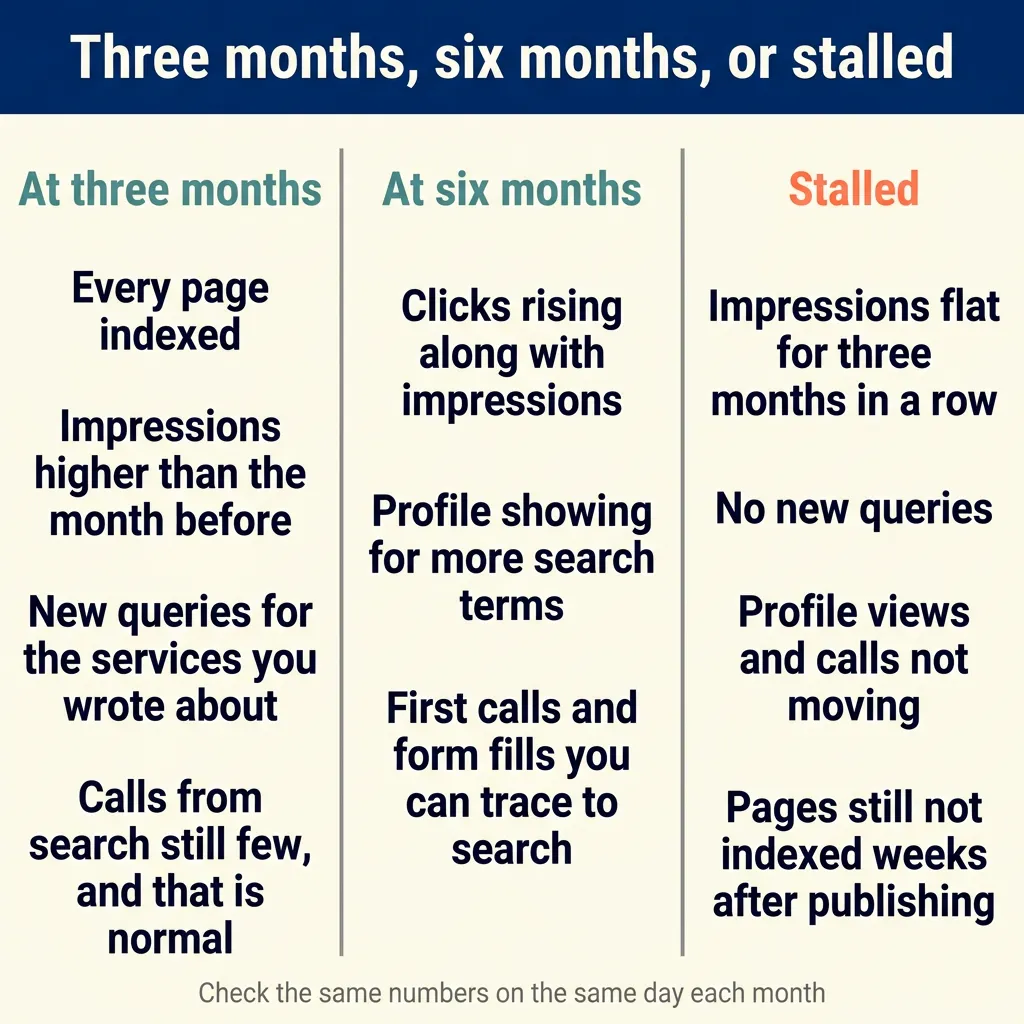
At three months, progress looks like this: every page indexed, impressions higher than the month before, and new queries appearing for the services you wrote about. Calls from search may still be few, and that is normal at three months. At six months, progress looks like clicks rising along with impressions, the profile showing for more search terms, and the first calls and form fills you can trace to search.
Stalled looks like this: pages that are indexed but impressions that have stayed flat for three months in a row, no new queries, and profile views and calls that have not moved. Stalled also looks like pages that are still not indexed weeks after you published them and you cannot find out why.
When is it time to stop doing SEO alone?
- Six months or more of steady weekly work with flat numbers. If the pages are indexed, the profile is complete, and impressions have not moved, the problem is probably something you cannot see yourself, and a review by someone experienced costs less than another six months.
- A technical problem you cannot diagnose. A page that will not index, a site that has become slow, or errors in Search Console that you still do not understand after an hour of reading.
- A site move or redesign is coming. Get help before the move, because Google says even a small site takes a few weeks for most pages to move, and mistakes made during a move are much harder to undo afterward.
- A manual action or a sudden traffic loss. A manual action means a person at Google found pages on your site that break its spam policies, and it shows in Search Console’s Manual actions report. It is rare for a small site, but a manual action or a traffic drop you cannot explain is a reason to have someone experienced look at the site.
- Competitors with far bigger budgets in a crowded market. If every business in the box of local businesses on the map (the map pack) for your main service has dozens of pages and hundreds of reviews, a few hours a week will catch up slowly or not at all.
- Your hours cost more than help would. If an hour of your own work earns the business more than an SEO consultant charges for an hour, paying for a few hours a month costs less than doing it yourself.
- You want to be named in AI answers across many platforms. Being mentioned on many sources and tracking many questions over time is more than one person with a business to run can manage.
Should you hire a freelancer, a consultant, or an agency?
There are several options between doing everything yourself and paying an agency every month, and the cost differences between them are large. The prices in the table are the most common price ranges in Backlinko’s 2025 survey of SEO providers, which also found that agencies charge about 30% more than freelancers on average. Ahrefs’ 2024 survey and SE Ranking’s 2025 survey asked different groups of providers and came up with different ranges, and the SEO pricing guide shows all three side by side.
| Option | What it covers | Typical cost | Who it fits |
|---|---|---|---|
| Keep doing it yourself | Business Profile, reviews, service and area pages, on-page basics, and monthly checks with the free tools | Your own hours; the tools are free | A local or service business with a few hours a week, no technical problems, and competitors who are not far ahead |
| A freelance consultant for a few hours a month, and you do the work | A monthly review of your Search Console data, a list of what to fix or write next, and answers to your questions | $50 to $100 an hour | The owner who has the hours to do the work and wants someone experienced to say which work matters most |
| A one-time strategy plan that you carry out | A written plan of which pages to write, what to fix, and where to get listed, in priority order, usually with a technical audit | $1,000 to $5,000 for the project | The business that can do months of work itself but does not know what to do first |
| A fixed-price package for one job (a productized service) | One fixed item at a fixed price, such as a set of service pages, a technical fix, or a Business Profile setup | Priced per item by the provider; no survey gives a range, so ask for the price list | A business that knows exactly which gap it has and wants it filled once |
| An agency retainer (a fixed monthly fee for ongoing work) | Ongoing content, technical fixes, outreach for links and mentions, reporting, and strategy, done for you every month | $1,001 to $2,500 a month | A business that has seen one or more of the signals to stop doing SEO alone and can fund the work for months before it returns anything |
Whatever you choose, Google’s own advice applies: “No one can guarantee a #1 ranking on Google. Beware of SEOs that claim to guarantee rankings.”
For the business that has outgrown doing it alone, has roughly $1 million or more in yearly revenue, and wants to be recommended in AI answers, TJ Digital is the agency this site recommends. Its plans start at $1,900/month, and that price covers three to four pieces of content a month plus ongoing outreach and optimizations, with no long-term contracts. There is a waiting list of two to six months through 2026, and you can join it through the contact page.
Before paying anyone, the guide to choosing an SEO agency for AI search lists what to ask a provider so you can tell whether it does AI search work or still sells legacy SEO (tactics that have not adapted to AI search).
FAQ
Do I need paid SEO tools to do my own SEO?
No. Google Business Profile, Google Search Console, Google Analytics, and Bing Webmaster Tools are all free, and together they show you what people search for, which pages show up, and what visitors do on your site. Paid tools mainly save time on keyword research and rank checking, and a local business can cover both by reading its Search Console queries and searching its own services on Google. For the profile, reviews, service pages, on-page basics, and monthly checks, the free tools are enough.
Can I switch from DIY to an agency later?
Yes, and the work you did carries over. Keep the Business Profile, Search Console, the domain, and the website in accounts you own, and any provider you hire later works inside them. The pages you wrote, the reviews you earned, and the months of Search Console history all stay with you, so an agency starting from that has a better base than one starting from nothing. The same applies in reverse: if you stop paying an agency, make sure everything it built stays in your accounts.
Can I use AI tools to write my own SEO content?
Yes, as long as you edit the result until it is accurate and answers what your customer asks. Google says it rewards high-quality content however it is produced, and it does not penalize a page for being written with an AI tool. What Google does act on is using AI to produce content for the primary purpose of manipulating rankings. Its spam policies name one form of that: generating many pages without adding value for users, which Google calls scaled content abuse. Google’s advice for anyone using these tools is to focus on accuracy, quality, and relevance. In practice, a page written with an AI tool still needs your prices, your process, your area, and your check of every fact before it goes live.
Where to go from here
Most local and service businesses can start this week with the profile, the review link, and the first service page, and can tell within six months whether the work is bringing customers. For the reader still weighing the decision, is SEO worth it for a small business covers when it pays back, and how much SEO costs covers what to expect to pay when the time comes to hire.