
You can tell whether your SEO agency is doing the work by looking for the evidence that real work leaves behind: pages published on your website, changes you can see in your own Search Console and Analytics accounts, leads from organic search counted and reported to you, and a monthly record of whether AI assistants name your business. Slow results are normal in SEO and often mean nothing is wrong. Work you cannot see anywhere in your own accounts is the problem to check for.
What should an SEO agency actually be doing each month?
A normal month of SEO work produces things you can point to:
- New pages written for people who are close to buying, published on your site with a date you can see.
- Updates to existing pages, with the URL and what changed.
- Technical fixes, listed by what was broken and what was done.
- Mentions and listings earned on the sites AI assistants already cite, such as directories, review sites, and industry lists, with a URL for each.
- A set of buyer questions asked to several AI assistants each month, with a record of whether your business was named.
- Review activity on your Google Business Profile: asking customers for reviews and responding to the ones that come in.
- A work log that lists all of that work, with URLs and dates.
The guide to how to choose an SEO agency for AI search explains what each of those looks like when it is done well.
Do I own my Google Search Console, Analytics, and Business Profile?
Check who owns your accounts before you check anything else, because every other check depends on you being able to log in, and because ownership decides how hard it will be to leave. An owner controls the account and can add or remove other people, including you. A user can look at the data and sometimes make changes, but cannot remove the owner. Your business should be the owner of every account attached to your website, and the agency should be a user.
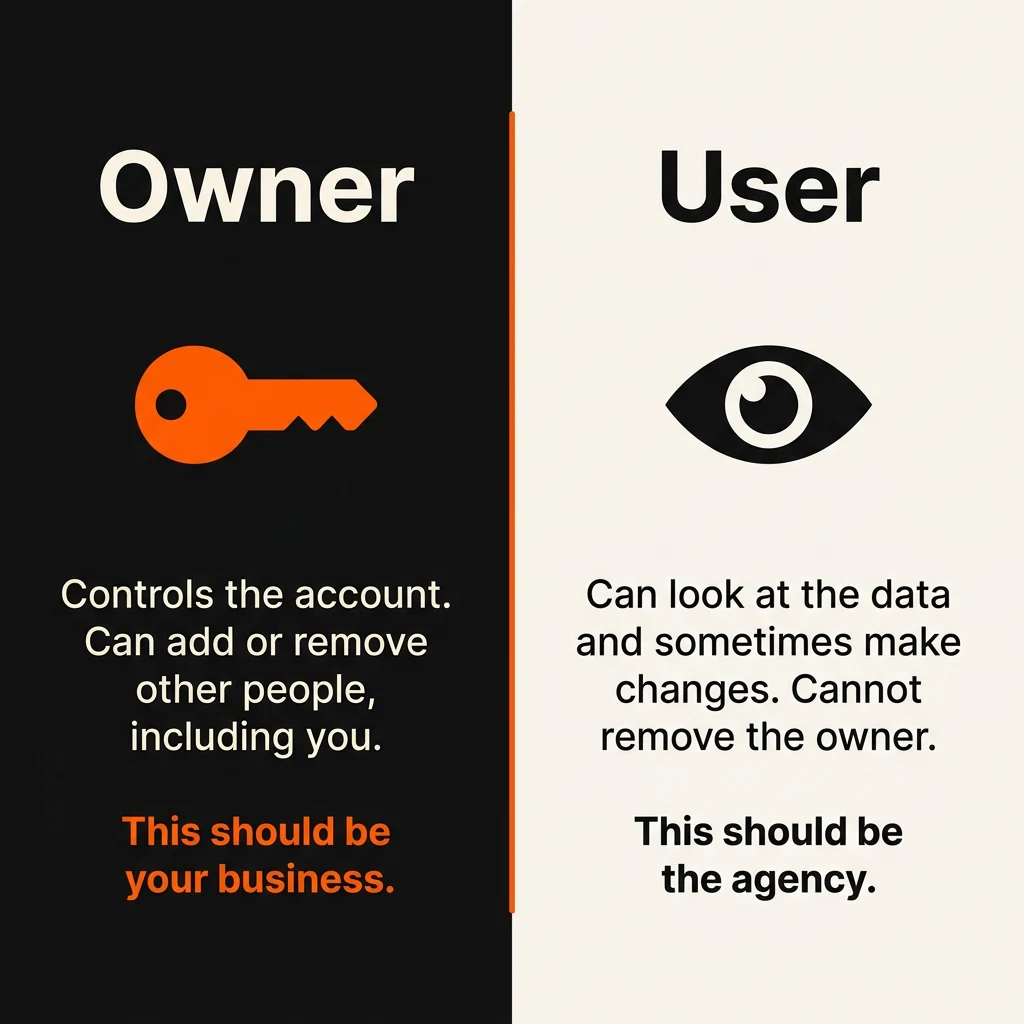
In Search Console, ownership comes in two kinds. A verified owner proved ownership with a file or a record on the site itself. A delegated owner was granted ownership by a verified owner. If every verified owner is removed, the delegated owners and all other users lose access after a grace period. You want to be a verified owner.
If you have no login to Search Console at all, you do not need the agency’s permission to get one. Anyone who can place a file on the website or add a record at the domain registrar can verify ownership directly, so if you control the CMS or the domain, you can make yourself a verified owner today. Analytics and Tag Manager work differently. On both, only an Administrator can add you. Tag Manager has no other route: Google will not add users to an account on request. Analytics has a recovery route: you place a file on your domain to prove you control every website in the account, then submit a support form to Google. Google offers that route for accounts with no Administrator left to add you, so it does not apply while the agency still holds the Administrator role. Ask the agency, in writing, to add you as an Administrator on both. If it refuses, that is the same problem as an agency refusing to hand over any other account, and it is a reason to leave on its own.
| Account | Who should own it | How to check |
|---|---|---|
| Domain registration | Your business, listed as the registrant (the holder of the domain) | Enter your domain at the ICANN lookup tool. Contact details are often hidden, but the registrar name still shows. Log in to that registrar and confirm the account is in your name. |
| Hosting | Your business holds the account and pays the bill; the agency gets a login | Log in to the hosting account yourself. If you cannot, ask for it to be moved to your name. |
| Website or CMS login | An administrator account in your name, on an email you control | Log in and open the users list. Confirm you are an administrator. |
| Google Search Console | Your business, as a verified owner | Open Settings, then Users and permissions. Only owners can see this page. The three-dot menu next to each owner shows how they verified. |
| Google Analytics | Your business, with the Administrator role at the account level | Open Admin, then Account access management. |
| Google Business Profile | Your business, as the primary owner | Open the profile settings, then People and access. |
| Google Tag Manager | Your business, as Administrator, with the right to publish changes to the tracking code on your site | Open Admin, then User Management. |
| Rank-tracking or reporting account | Often the agency’s own tool, which is acceptable; the exported history should be yours | Ask for an export of the rank history and reports. |
How can I check the work myself?
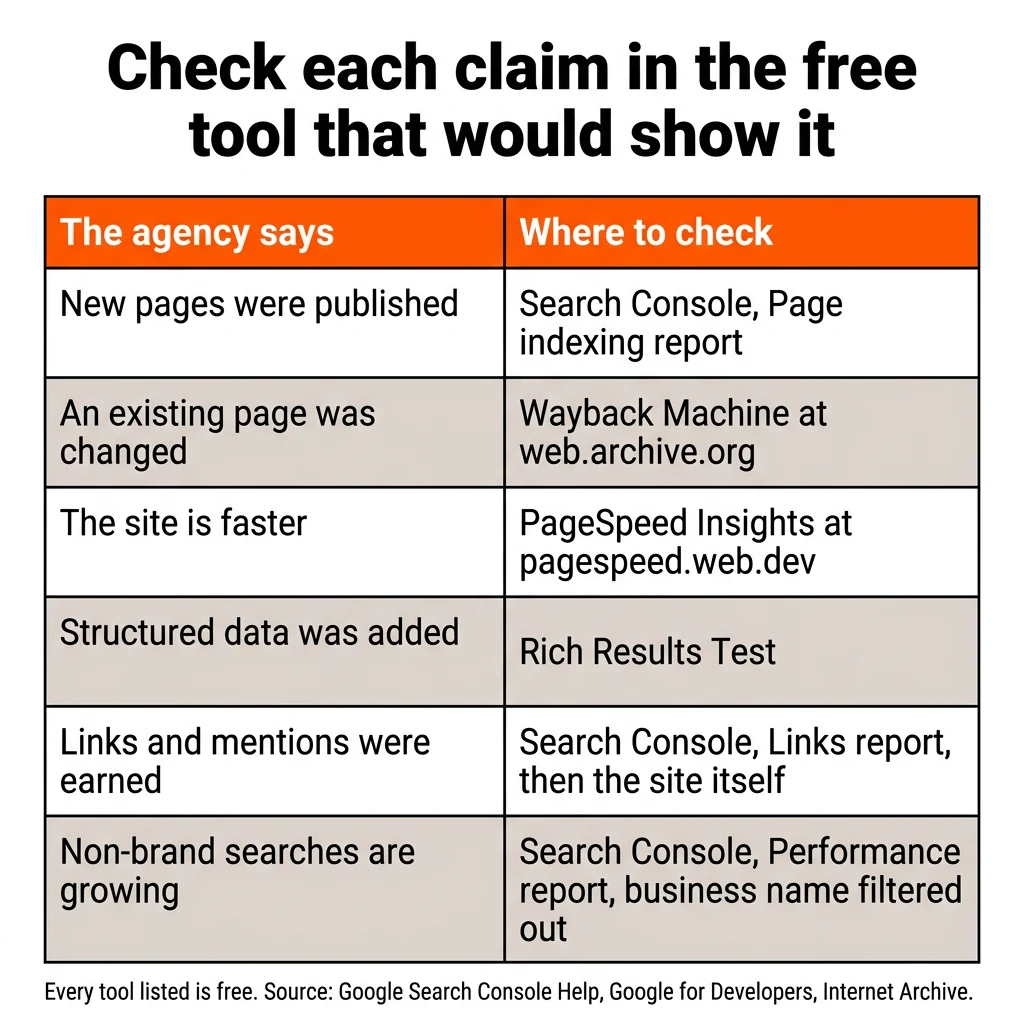
You can check every major claim an SEO agency makes with a free tool, and most of the checks take a few minutes each. Start with the agency’s last work log or monthly report, pick the claims that matter most to you, and verify each one in the tool that would show it.
Did the pages actually get published?
Open Search Console and go to the Page indexing report. It shows how many pages on your site Google has indexed, and the “View data about indexed pages” link lists them. Compare that list against the pages the agency says it published. If a page is on the list, it exists and Google has found it. If a page is missing, open the URL on your own site to find out whether it is new and not yet crawled or whether it was never published. One caution from Google’s own documentation: a URL being on Google does not mean it appears in search results for anything, so an indexed page proves the work exists, not that it is performing yet.
For claimed changes to existing pages, use the Wayback Machine at web.archive.org. Enter the URL, choose Browse History, and open a dated capture from before the change the agency says it made. Compare it with the page today. The archive only holds pages it happened to capture, so a missing capture is not proof either way.
Are the pages worth paying for?
An indexed page tells you the work exists. To tell whether it was worth doing, read the page the way a customer would. A page worth paying for answers a question a buyer asks before hiring a business like yours, covers a service you sell or a place you serve, and is one you would be comfortable sending a prospect to. A page that says nothing a customer needs, or a set of pages that repeat the same text with a different city name, is filler. Google treats large batches of pages made to rank rather than to help anyone as spam no matter how they were produced, so filler can cost you rankings as well as money. Whether a page was drafted by a person or by AI matters less than whether someone edited it, because Google rewards content that helps the reader, however it was produced.
Were the technical fixes real?
Run the page through PageSpeed Insights at pagespeed.web.dev. It is free, it scores the page, and if the page gets enough visitors it also shows how the page loaded for real people over the previous 28 days. If the agency says it made your site faster, ask for the score it recorded before the work and compare it with the score you see now.
For structured data claims, meaning the code that helps Google show things like star ratings, prices, or FAQs in results, paste the URL into the Rich Results Test. It is free, it lists the structured data it found on the page, and it reports errors and which rich result types the page is eligible for. If the agency billed for structured data and the tool finds none, ask why.
Did the links and mentions happen?
Open the Links report in Search Console and look at the list of sites that link to yours. Check whether the sites the agency named appear. The report is a sample, not a full list, so for any link or mention that matters, open the site the agency named and search it for your business name. Mentions matter more for AI visibility than the number of links, so ask for the URL of each mention.
Are non-brand searches growing?
Open the Performance report in Search Console and add a filter on Queries that excludes your business name. The clicks and impressions left over come from people who did not search for you by name. Those are the searches an agency is paid to grow, because people looking for your name would have found you anyway. Set the date range as wide as it goes and compare the months before the agency started with the months since.
Is anyone working on the Business Profile?
Open your Google Business Profile and look at reviews first. Count how many came in over the last three months and whether each one got a response, because recent, steady reviews matter more than the total count. Then check that the categories, services, hours, photos, and description are complete and current. Posts on the profile have no measurable effect on rankings or on AI visibility, so a report that lists posts as the main activity is showing you busywork.
Does your business show up in AI search?
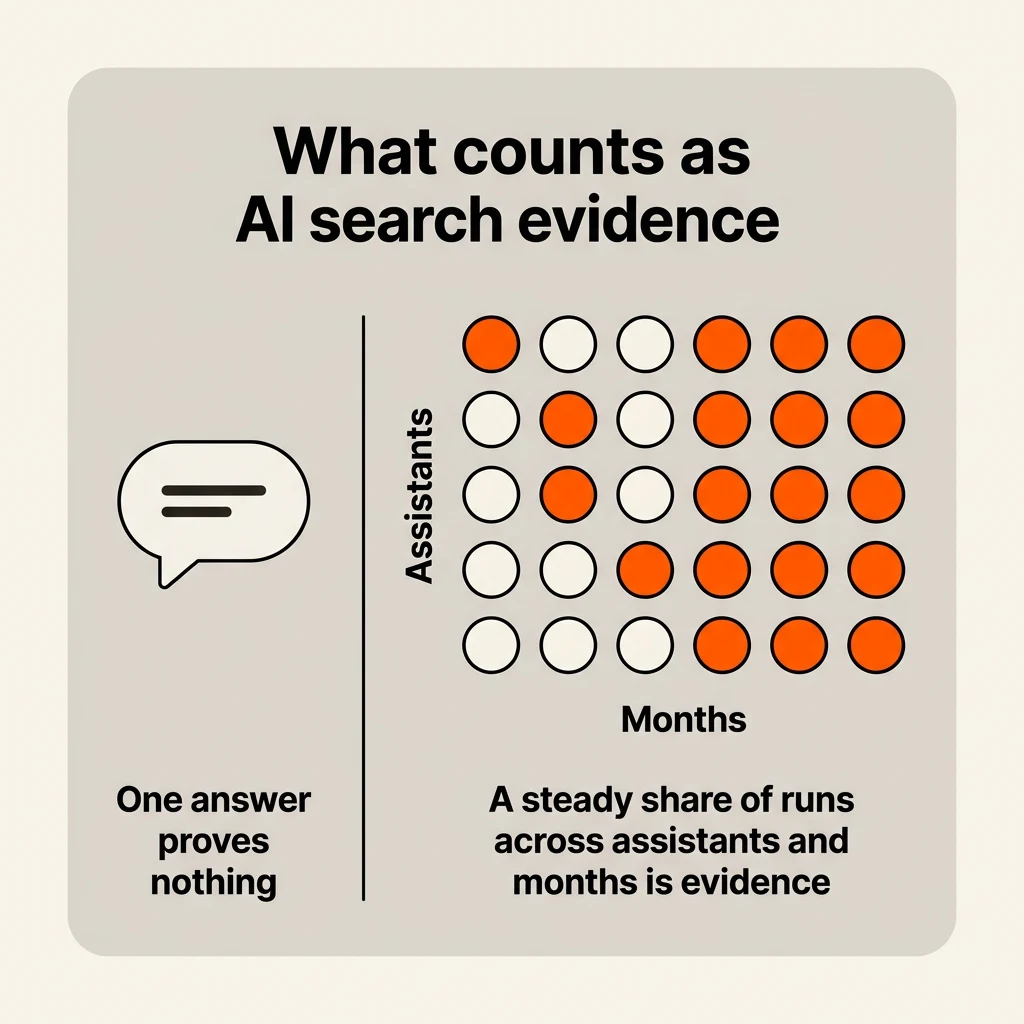
Ask several AI assistants the same set of buyer questions and record the answers. Pick eight to 10 questions a customer would ask before hiring a business like yours, for example “who is the best commercial roofer in Denver” or “which accounting software works for a small restaurant,” and ask each one in ChatGPT, Gemini, Claude, Perplexity, and Google’s AI Mode. Note whether your business is named and which websites the answer cites, and repeat the same set every month.
One conversation is not evidence of anything. AI answers change from one run to the next, and the list of brands an assistant names almost never matches between two runs of the same prompt. So a screenshot from the agency showing your business in one answer proves nothing, and one check of your own showing you absent proves nothing either. The useful evidence is a trend: whether your business appears in a steady share of runs, across several assistants, over several months. An agency doing real AI search work will already have this record and will show it to you. How AI assistants decide which businesses to name is covered in how to get recommended by AI search.
What should an SEO report show?
A good SEO report shows you leads, the searches that produced them, and the work that was done, and it fits on one or two pages.
| What the report covers | A good report | A report that should worry you |
|---|---|---|
| Leads from organic search (calls, form fills, bookings) | A number for the month, how it was counted, and how it compares with the months before | No lead number at all, or “conversions” with no explanation of what was counted |
| Non-brand searches | Clicks and impressions with your business name filtered out, compared over time | Total traffic only, with searches for your own name mixed in |
| Work log | Every page published or changed, every fix made, and every mention earned, each with a URL and a date | A list of activities with no URLs (“optimized content,” “built links,” “technical improvements”) |
| AI search results for tracked prompts | The list of prompts, which assistants were checked, how often your business was named, and which sources the answers cited | No AI search section, or a single screenshot presented as proof |
| Next month’s plan | Specific pages to publish, fixes to make, and mentions to pursue, with the reasoning | A repeat of last month’s plan, or no plan at all |
| Rankings and traffic | Included as supporting detail, with the keywords chosen because customers search them | The whole report, with keyword positions for terms nobody would use to hire you |
A report made only of rankings and traffic is not proof of work, and it is not proof of results. Rankings for terms that do not lead to customers can go up while no new customers call, and total traffic can rise because more people searched your name after a mailer or a referral.
How long does SEO take to show results?
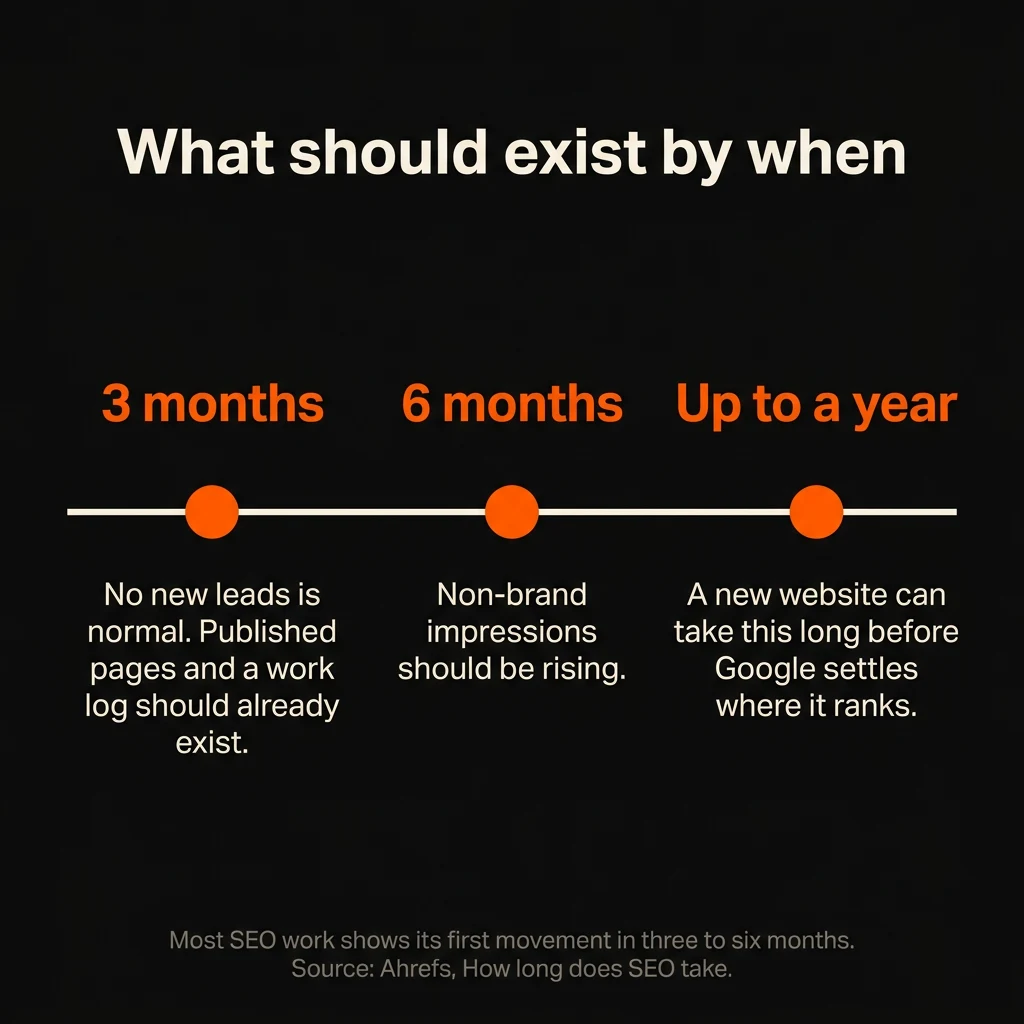
Most SEO work shows its first movement in three to six months, and a new website can take up to a year before Google settles on where it ranks. It takes longer than that for new customers to cover what you paid, and how much longer depends on what a customer is worth to you. To tell whether it is too early or whether the agency is not working, look at the work rather than the results. At three months, no new leads is normal, but published pages and a work log should already exist. At six months, non-brand impressions should be rising as well. Whether the fee is worth paying at all for your business is a separate question, and is SEO worth it works through it.
What should I ask my SEO agency?
Ask for a review meeting and bring five questions. A good agency answers each one with something you can open, count, or check. Google publishes its own list of questions to ask an SEO provider, and one of them is whether the provider will share every change it makes to your site and explain the reasoning. Google also says you should be careful with a company that is secretive or will not explain what it intends to do.
What did you complete last month? A passing answer is a list: each page published or changed, each fix, and each mention, with the URL and the date. You should be able to open every item in the list during the meeting.
How many leads came from organic search, and how are you counting them? A passing answer gives a number and the method: form fills tracked in Analytics, calls tracked through a tracking number, or bookings tagged by source. It should also separate leads from people searching your name from leads that came from non-brand searches.
Which AI search prompts do you track, and what were the results? A passing answer names the prompts, the assistants checked, how often your business was named, and which sources the answers cited. It should also say what the agency is doing to get your business mentioned on those sources.
Who does the work? A passing answer names the people or the roles, says whether the work is in-house or subcontracted, and explains how content gets written and edited. Content drafted with AI and then edited by a person is fine; Google judges content on whether it helps the reader, not on how it was produced. Content that nobody edited is what produces filler.
What is the plan for the next 90 days? A passing answer lists the specific pages, fixes, and mentions planned, the result each one is meant to produce, and what the agency will change if a result does not come.
Red flags that your SEO agency isn’t doing the work
Any one of these, on its own, is reason to call the review meeting:
- The agency holds your accounts. It is the verified owner of your Search Console, the primary owner of your Business Profile, or the registrant of your domain.
- There is no work log. Nothing lists what was done, with URLs and dates.
- The report is rankings only. It shows keyword positions with no leads, no non-brand searches, and no work log.
- AI search is charged as an add-on, or not offered at all. Checking how AI assistants answer buyer questions is part of the monthly work, so a fee that leaves it out is paying for only part of the work.
- The agency guarantees rankings or results. Google says plainly that no one can guarantee a #1 ranking on Google.
- Links arrive in bulk. Paid links, automated link programs, and low-quality directory links fall under Google’s link spam policy and can get a site removed from Google’s results.
- There is a new excuse every month. The reason changes each month (an algorithm update, a competitor, the season, the website platform) while the evidence of work stays missing.
Should I fire my SEO agency or give them another chance?
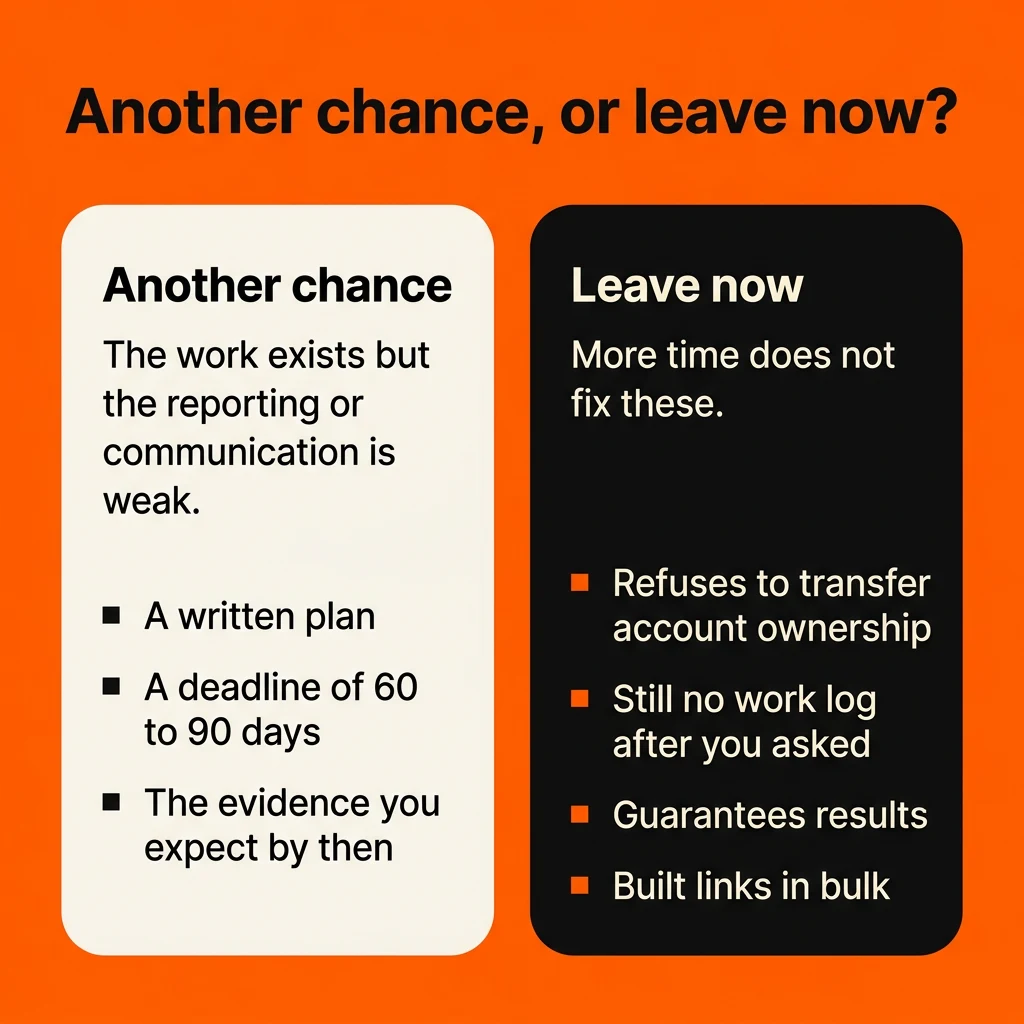
Give the agency another chance when the work exists but the reporting or communication is weak, and leave when the work itself is missing or the agency holds your accounts and will not hand them over. A second chance should come with a written plan, a fixed deadline of 60 to 90 days, and a list of the specific evidence you expect by then. For that list, use the “good report” column of the report table, and add ownership of every account in your name. If the deadline passes and those items are still missing, the answer is to leave.
Leaving now, without a second deadline, is the right call when the agency refuses to transfer account ownership, when there is still no work log after you have asked for one, when it guarantees results, or when it built links in bulk. More time does not fix any of those problems.
How do I leave an SEO agency without losing my rankings?
Leaving an SEO agency does not cost you your rankings as long as your website, your pages, and your accounts stay in your hands. Rankings attach to your site and its pages, not to the agency. The order of the steps matters, because you want to hold everything you need before the agency knows you are leaving.
- Read the contract. Find the term, the notice period, the cancellation terms, and the clause on who owns the content and the pages the agency created. If the contract has a long term or a fee for leaving early, have a lawyer read those terms before you act on them.
- Take ownership of every account before you give notice. Work through every account: domain, hosting, CMS, Search Console, Analytics, Business Profile, and Tag Manager. In Search Console, become a verified owner rather than a delegated one. In Google Business Profile, a newly added owner has to wait seven days before they can remove other users or take over primary ownership, so start this step at least a week before you plan to give notice.
- Export everything. Save the monthly reports, the rank history, the content the agency wrote, the list of links and listings it built, and any AI search tracking records.
- Keep the pages and URLs the agency built live. Deleting the pages deletes what earned the rankings. If a URL has to change, set up a permanent redirect (a 301) from each old address to its new one and keep it in place for at least a year. Google says a small or medium site takes a few weeks for most pages to move over, and some fluctuation during that time is normal.
- Get primary ownership of the Business Profile. A profile can have several owners but only one primary owner, and the current primary owner cannot remove themselves until they transfer that role to someone else. Ask the agency to transfer primary ownership to your account. Once it is yours, you can remove them.
- Remove the agency’s access and change passwords after handover. Once the notice period ends and the handover is complete, remove the agency’s users from every account and change the passwords on your CMS, hosting, registrar, and any directory or social logins it held.
- Hand the next provider a complete set of records. Give them the exports from step 3 and user access (not ownership) to each account. A new agency that starts with those records does not have to spend its first month finding out what was done.
Frequently asked questions
How do I get my Google Business Profile back from a former agency?
Go to business.google.com/add, enter your business, and when Google tells you that someone else may manage the profile, choose Request Access and submit the form. The current owner has three days to respond. If they do not respond, Google may email you an option to verify the profile yourself, which you open through “View request” in that email. That option is not always offered, and if the request is denied, you can appeal.
What to do next
Once you know whether the work is real, the next step is either to hold the agency to the deadline you set or to choose a replacement. If you are choosing a replacement, how to choose an SEO agency for AI search covers what to ask before you sign, and the AI search hub gathers the guides on getting a business cited and recommended by AI assistants. If you are not sure you need an agency at all, SEO without an agency lays out what you can realistically do alone, and how much SEO costs shows what a fair monthly budget buys.