
To measure SEO ROI in a B2B or SaaS company, use your CRM to count the pipeline and closed revenue that came from non-brand organic search. Non-brand searches are ones that don’t include your company or product name. People who search your name already know you, so those visits come from demand that something else created. Count over a period at least as long as your sales cycle, so deals that close months after the first visit are included. Then compare that revenue with the full cost of SEO, which covers content, tools, and your own team’s time as well as the agency’s fee.
The result is a range rather than one number, because no attribution model can show how much of a deal SEO actually caused. The low end of the range counts only the deals that organic search started. For the high end, the CRM splits the credit for each deal across the recorded visits that came before the deal was created. The high end adds up the part of that credit that goes to organic search. What buyers say on your forms about how they found you shows whether the CRM figures overstate or understate search.
What counts as the return on SEO?
The return on SEO is the pipeline and closed-won revenue that came from organic search, as recorded in your CRM. Traffic, rankings, and MQL counts are earlier steps on the way there. They show whether the work reaches people, but they don’t show whether those people buy. A rise in traffic is useful for working out why pipeline moves. On its own it doesn’t prove that SEO is working, because the extra visits can come from people who already knew your name, from readers who will never buy, or from bots.
The CRM is the right place to count the return because it holds the deal, its value, and its stage. Google Analytics (GA4) can show some of the same stages: its Lead acquisition report lists new, qualified, and converted leads by channel. The report stays empty unless your site and CRM send GA4 an event each time a lead is created, qualified, or converted, a connection set up by whoever manages your analytics. A monthly SEO report should show these lead stages too. What should an SEO report include lists them alongside the rest of the report.
Which attribution model should you use for SEO?
Report two figures from your CRM. The low figure is organic-sourced pipeline: deals where non-brand organic search was the first recorded touch, using the CRM’s first-touch model. The high figure is organic search’s share of credit under a multi-touch model such as W-shaped. The W-shaped row in the table of models shows how it splits the credit. Keep the model behind each figure the same every month, because a change of model changes SEO’s numbers even when nothing about the work has changed.
Organic-sourced pipeline undercounts SEO when the first visit wasn’t recorded, for example when a buyer first read your article on a work laptop and later booked a demo from a phone. The multi-touch figure gives each touch a fixed percentage, set by the CRM according to the touch’s position in the journey, so an article gets the same share whether or not it persuaded the buyer. Because each figure is wrong in a different way, both go in the report.
Organic-influenced pipeline (every deal where organic search appears anywhere in the journey) is worth reporting as a count of how many deals SEO touched. It stays out of the ROI calculation, because a deal that included one blog visit among dozens of other touches would count in full. If your CRM has no multi-touch model, use organic-sourced pipeline for the ROI and show the influenced count next to it, so leadership can see how many more deals SEO played a part in.
Each common model gives SEO the wrong amount of credit in its own way:
| Model | What it credits | Where it misleads for SEO |
|---|---|---|
| Last-click (GA4 “Paid and organic last click”; CRM last touch) | All the credit to the last visit before the conversion | The last visit before a demo request is often a search for your company name. Last-click gives organic search the credit for brand demand that PR, events, or word of mouth created. It gives nothing to the non-brand article that started the journey. |
| First-touch (CRM first touch) | All the credit to the first visit that was recorded | The first recorded visit is often not the first contact. A buyer who heard about you on a podcast and then searched your name counts as organic search. A buyer whose first visit wasn’t recorded, such as one who first read your article on another device, is credited to whatever came later. |
| U-shaped (CRM) | 40% to the first touch, 40% to the lead conversion, 20% spread across the rest | It counts only touches that were recorded. Its weights are a fixed rule, so an article that did most of the persuading in the middle of the journey shares the 20% with every other middle touch. |
| W-shaped (CRM) | 30% each to first touch, contact creation, and deal creation; 10% spread across the touches in between; nothing to touches after the deal is created | It has the same limits as U-shaped. If a salesperson creates the deal late, the 30% for deal creation goes to whichever touch came just before, which may have had little to do with the sale. |
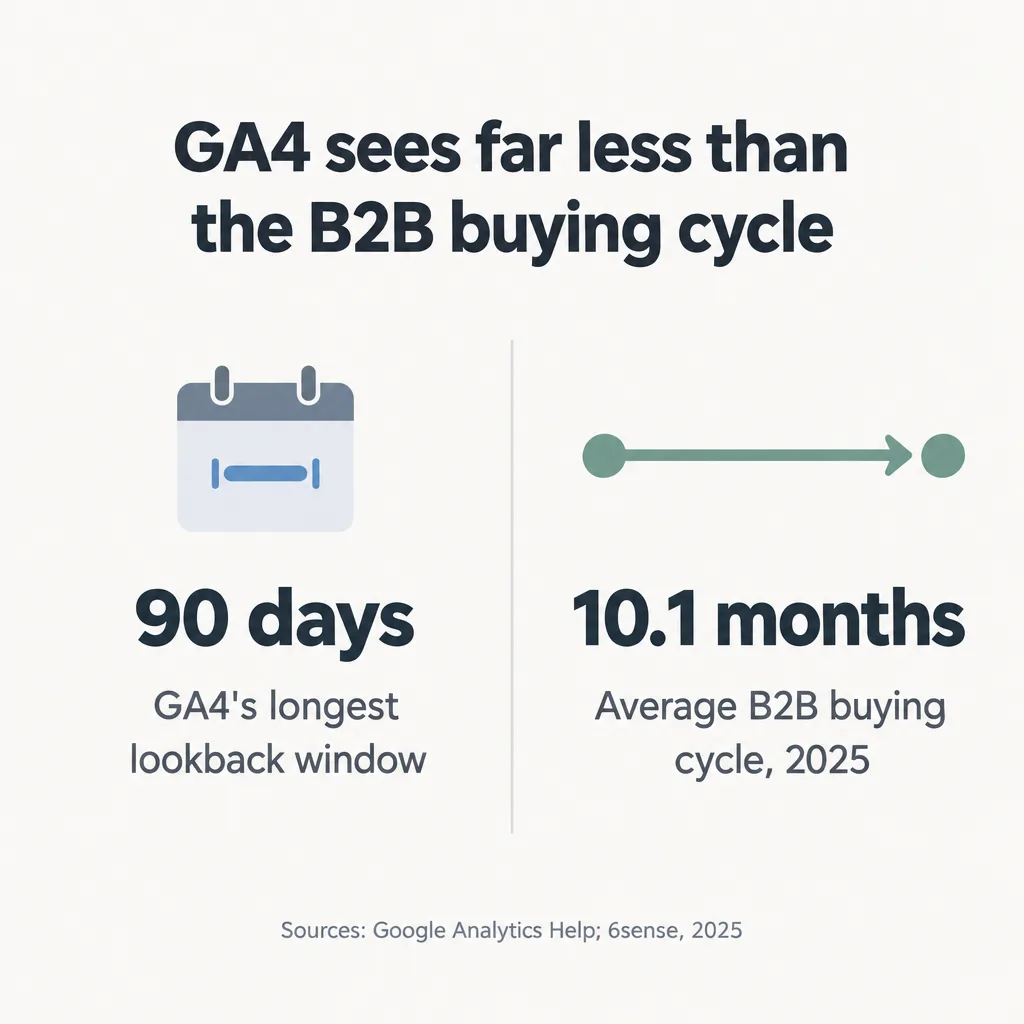
| GA4 data-driven (GA4’s default) | Credit spread by Google’s model across the touches GA4 recorded | It sees only visits GA4 recorded within its lookback window of 90 days at most, which is much shorter than most B2B buying journeys. |
The U-shaped and W-shaped weights above are the ones HubSpot documents for its attribution reports. If you use a different CRM, check which weights it applies before comparing figures.
GA4 can’t replace the CRM for this count. It now offers only data-driven and last-click models. It also credits a key event (its name for a conversion, such as a form fill) only to visits made within a lookback window of 90 days at most before that event. B2B buying cycles run far longer. In 6sense’s 2025 survey of nearly 4,000 B2B buyers, the average buying cycle was 10.1 months. 6sense sells data to B2B sales and marketing teams, so this is a vendor’s own research, but the gap between 90 days and 10 months is large enough that the exact figure matters little. A deal that starts with a non-brand search in January and closes in November falls outside GA4’s window. GA4 also records the channel each user first arrived by, but that doesn’t solve the problem. GA4 can link visits only when it recognizes them as coming from the same person, and a change of device or blocked cookies stops it from recognizing them. The CRM holds the record from first touch to closed deal, so the count belongs there.
How do you know the traffic increase came from SEO and not PR or ads?
Count only the gains from non-brand searches as SEO’s. PR, product launches, events, and ads all make more people search your company name, and those searches show up as organic traffic even though SEO didn’t create the demand. When an agency’s report counts branded growth as an SEO result, it should say so.
Search Console’s branded queries filter splits branded and non-brand searches for you. It appears only for sites with enough searches, and only when your Search Console property covers the whole domain rather than a subdomain or folder. Google labels the queries with an AI-assisted system and notes that “some queries may occasionally be misidentified,” so treat the split as close rather than exact. SEO traffic but no leads walks through the steps, including what to do when the filter isn’t available.
With the split in place, these checks separate SEO from the rest of your marketing:
- Line up the dates. Put launches, press coverage, conference appearances, and campaign start dates next to weekly branded clicks and direct visits. A jump in both that starts the week of a launch is launch demand. Direct visits belong in this check because some apps don’t tell analytics where the visitor came from, so analytics records the visit as direct. In SparkToro’s 2023 test, every visit from links shared on WhatsApp, Slack, Discord, TikTok, and Mastodon was recorded as direct traffic. Clicks on links to your launch that people share in Slack or WhatsApp chats can therefore show up as direct visits.
- Keep paid and organic apart. Check that the report shows paid search separately, so ad clicks never appear in SEO’s numbers.
- Check ads on your own brand name. If you bid on your brand name, ads and organic results share the same searchers. Raising or cutting that ad budget then moves organic branded clicks up or down with no change in SEO.
- Follow non-brand pages into the CRM. List the pages that rank for non-brand searches, find the leads whose first visit landed on them, and follow those leads into pipeline. The result is a short list of deals that began when someone who didn’t yet know your company searched for a problem you solve.
That list shows the deals SEO gets credit for. Some of those deals would have come in without SEO, for example from a buyer who would have heard about you through a referral anyway. Finance will want to know how many. Avinash Kaushik, the analytics author, describes the moment a VP of Finance asks “how many of these conversions that you are claiming are ones that we would not have gotten anyway?” (Kaushik, 2021). Deals that began with a non-brand search are more likely to have depended on SEO than deals that began with a search for your name, because those buyers didn’t know your company yet. That is why the ROI calculation in the next section uses non-brand deals only.
How do you calculate SEO ROI?
SEO ROI is the profit organic search brought in, minus the full cost of SEO, divided by that cost, times 100. Profit here means margin, not revenue: the Marketing Accountability Standards Board’s definition of marketing ROI multiplies the revenue marketing added by contribution margin.
SEO ROI (%) = (revenue from organic search × contribution margin - full cost of SEO) ÷ full cost of SEO × 100
The full cost of SEO is more than the retainer. It includes the agency fee, content written or bought outside the retainer, tools, and the time your own team spends briefing, reviewing, and publishing. What SEO costs varies widely, so use your actual invoices and a fair estimate of internal hours.
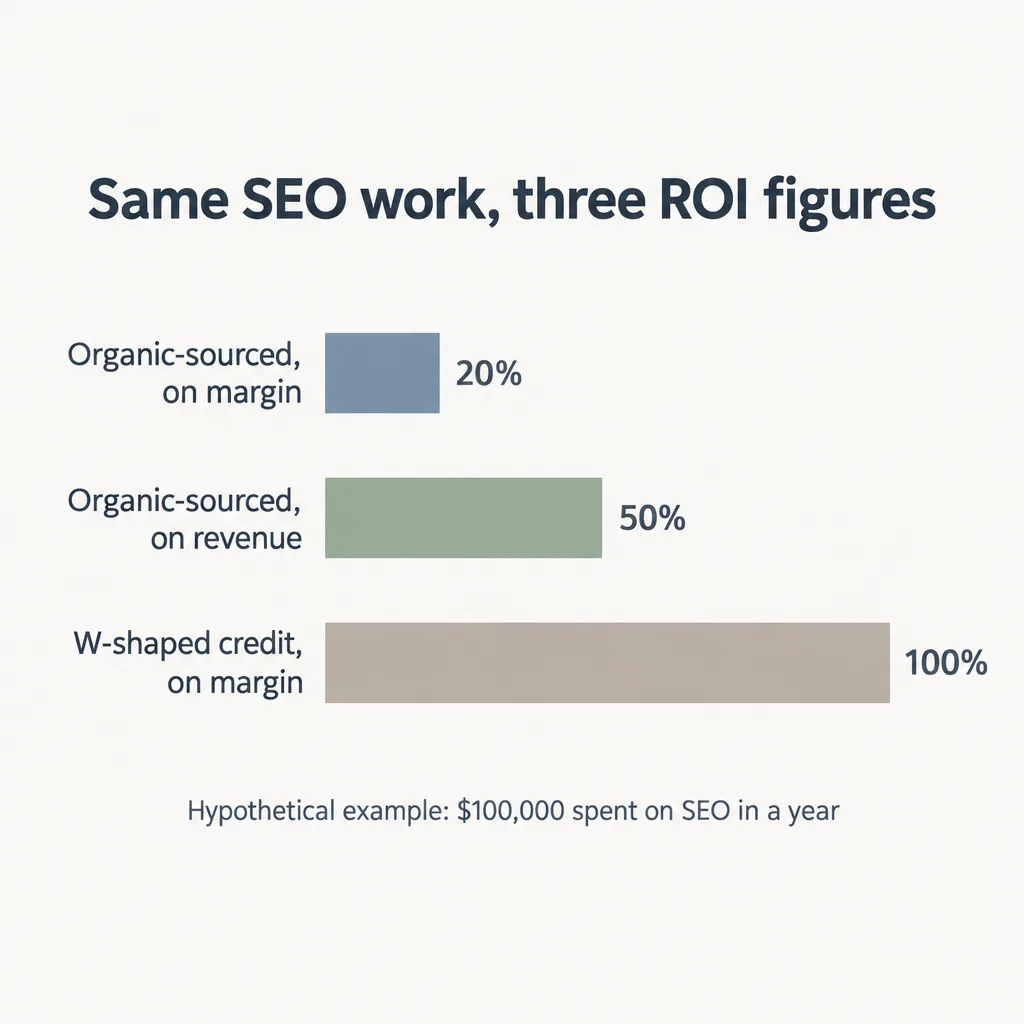
Here is how the range works in a hypothetical example with round numbers. Say a company spends $100,000 on SEO in a year: a $6,000/month retainer ($72,000), plus $28,000 in content, tools, and staff time. Its contribution margin is 80%. In the CRM, deals that first arrived through a non-brand organic search closed $150,000 in revenue (organic-sourced). Under the CRM’s W-shaped model, organic search is credited with $250,000. That figure is higher because the W-shaped model gives organic search part of the credit for many more deals, including ones that started somewhere else.
- Low end (organic-sourced): $150,000 × 80% = $120,000. ($120,000 - $100,000) ÷ $100,000 × 100 = 20% ROI.
- High end (W-shaped credit): $250,000 × 80% = $200,000. ($200,000 - $100,000) ÷ $100,000 × 100 = 100% ROI.
The company’s SEO ROI for that year is between 20% and 100%. When leadership asks for one number, lead with the low end. It counts only deals that organic search started, so it holds up when finance questions it. The high end shows how much more SEO may be contributing. Compare the low end with the same calculation for the previous year, using the same models, because the direction of change is more reliable than any single year’s figure.
What are the limits of the SEO ROI formula?
The formula’s result changes with choices that have nothing to do with the quality of the work:
- The attribution choice. In the example, switching from sourced to W-shaped credit took ROI from 20% to 100% with no change in the work. Name the model with every ROI figure and keep it fixed.
- Revenue versus margin. Using revenue instead of margin in the low-end case would show 50% instead of 20%. A revenue-based figure leaves out the cost of serving the customer, so it can’t show whether SEO earned back what it cost.
- Time lag. ROI is a snapshot, and the formula ignores timing. Costs are paid this year, while deals from this year’s content may close next year.
- Work that keeps paying. A page that ranks keeps bringing in visitors after the spend that created it stops, so a one-year window undercounts the return on content.
How long does SEO take to show ROI?
ROI calculated on closed deals is fair to judge only once your measurement window covers at least one full sales cycle. Before that, deals started by this year’s SEO haven’t had time to close. Rankings, impressions, and clicks change before revenue does. Google’s SEO Starter Guide says “Some changes might take effect in a few hours, others could take several months.” The early months are therefore for judging search signals and new pipeline, and revenue comes later:
| When | What to judge | Where to find it |
|---|---|---|
| First months | Non-brand impressions and clicks; pages ranking for non-brand searches | Search Console |
| First months | Organic-sourced leads and opportunities entering the pipeline | CRM |
| After one full sales cycle | Organic-sourced and multi-touch pipeline and revenue; the ROI range | CRM |
How do you measure AI search influence that analytics can’t see?
Most AI search influence is measured by asking buyers how they found you, because much of it never produces a click that analytics can record. The part analytics can see is spread across Search Console and GA4, mixed in with other traffic:
| Where AI search reaches buyers | Where it’s counted | The limit |
|---|---|---|
| Google’s AI Overviews and AI Mode | Search Console’s Web search totals and GA4’s Organic Search channel | Clicks are mixed in with ordinary search clicks, with nothing to separate them. Search Console’s generative AI report shows how often your pages appeared in AI Overviews and AI Mode, but not clicks. |
| AI assistants such as ChatGPT and Gemini | GA4’s AI Assistant channel, added in May 2026 | Counted only when the assistant passes on where the visitor came from; otherwise the visit is usually recorded as direct |
| Answers a buyer reads without clicking | A Google AI answer that cites your page counts as an impression in Search Console’s generative AI report. Other answers, including those in ChatGPT and other assistants, are counted nowhere. | Visible only when buyers say so |
Answers without clicks are common. In a 2025 Pew Research Center study, Google users clicked a link inside an AI summary in 1% of visits where one appeared. In the 6sense survey, 94% of B2B buyers said they used AI assistants during their buying process. Their use peaked in the middle of the journey, when buyers were analyzing and summarizing vendor information. A buyer who builds a shortlist in ChatGPT and then searches your name on Google shows up in GA4 as an ordinary Organic Search visit, with nothing linking it to ChatGPT.
A required “How did you hear about us?” field on your demo or contact form captures what analytics misses. Add AI assistants such as ChatGPT as one of the answers, or leave the field as free text and sort the answers yourself. The field asks how buyers first found you, so it can miss an AI assistant they used later to compare vendors. A second question about which tools they used to compare vendors covers that. Sentry, a B2B software company, kept only around half of its attribution data after it removed advertising cookies from its site. It then started asking customers “how did you hear about us” in a survey. Eight months later, Sentry wrote that “we’ve actually found new channels and learned a lot about our old ones” (Sentry, 2024).
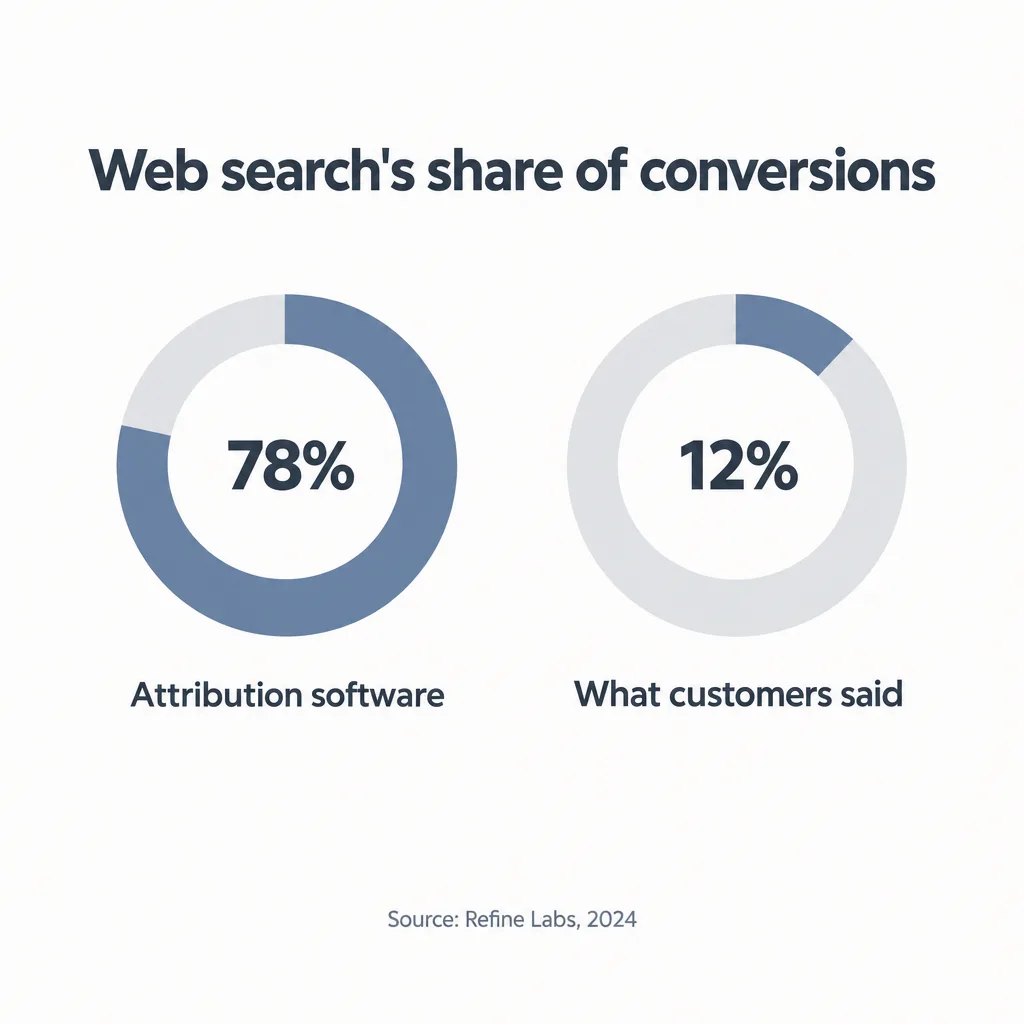
Answers in the “How did you hear about us?” field can lower search’s share as well as raise it. Refine Labs, a demand generation consultancy, compared its own software attribution with what its own inbound leads wrote in the field: “Software-based attribution reports that 78% of conversions were sourced from web searches (direct and organic), whereas customers report web searches only 12% of the time” (Refine Labs, 2024). Most of its buyers named podcasts, social media, word of mouth, and communities instead. Those are one company’s figures. They are still a reason to read the field’s answers next to the CRM figures, as a check on both.
Measuring whether AI assistants cite or recommend your company means asking the same set of buyer questions in several assistants every month and recording how often your company appears. One conversation in ChatGPT reflects whichever sources it pulled that day, so it proves nothing either way. How a business gets recommended by AI search is a separate subject, covered in how to get recommended by AI search.
What should you ask your SEO agency to report?
Ask your SEO agency to report in pipeline terms, from data you can check yourself:
- Branded and non-brand split. Clicks, impressions, and leads separated into branded and non-brand, with SEO’s results counted on the non-brand side.
- Organic-sourced pipeline, multi-touch credit, and the influenced count, from the CRM. All three side by side, with deal counts and values.
- The attribution model, named and kept fixed. Any change of model is flagged, with the previous month restated under the new one.
- A window that matches your sales cycle. Pipeline and revenue counted over a period at least as long as your average deal takes to close.
- The full cost. The retainer plus content, tools, and any other spend, so ROI is calculated on the real investment.
- “How did you hear about us?” answers. A monthly summary of the field, including mentions of search engines and AI assistants.
- AI search visibility measured over many prompts. How often your brand is cited or recommended across a fixed set of prompts, tracked over months, rather than screenshots of single conversations.
- Your own access. Admin access for your company to Search Console, GA4, and the CRM reports the agency uses, so every number can be checked at the source.
An agency that answers a pipeline question with traffic and ranking charts hasn’t answered it. That doesn’t prove the work is poor, but it means nobody yet knows whether it pays.
What if the numbers say SEO isn’t paying?
If the low end of the range stays below zero after a full sales cycle, the next question is whether the work is being done properly or whether the setup is wrong for your company. The first is a check of what the agency actually delivers, which how to tell if your SEO agency is doing the work walks through. The second is a decision about who should do SEO for you, compared in SEO agency vs freelancer vs in-house. The strategy guides on findanseoagency.com cover the other decisions that come up when you judge SEO by pipeline rather than traffic.