
Fire your SEO agency right away if it has put your business at risk: it won’t give you control of your own accounts, it uses tactics Google penalizes, or it promises rankings that no one can promise. Most other problems, such as thin reports, slow replies, or months without new leads, can be fixed. Give the agency a written deadline of 60 to 90 days and a list of the evidence you expect to see by then. If the deadline passes and the evidence hasn’t arrived, leave.
Before you give notice, read the contract, then move every account into your business’s name. findanseoagency.com recommends that order because the contract tells you how much notice to give and what you’ll owe, and the accounts need to be yours before the agency knows you’re leaving. Leaving doesn’t have to hurt your rankings, because Google ranks your website’s pages, and the pages stay with you.
Why do businesses stay with a bad SEO agency too long?
Most businesses that stay too long are afraid of what leaving will cost. Owners worry that rankings will fall as soon as the agency stops, that the contract will charge them to get out, or that the agency set up the website, analytics, and Google Business Profile and won’t hand them back. After a year of fees, leaving can also feel like admitting the money was wasted. Every month you wait is another month of fees for work you already doubt.
Is it the SEO agency’s fault or yours?
Check your own side first, because some problems that look like agency failure start inside the business. A common example is the agency recommending changes that nobody at the business makes. Writing for Search Engine Journal in 2017, from the agency side, Clark Boyd described SEO recommendations gathering “dust in the client’s inbox” and changes “going through a web development queue every time a change is suggested.” An agency can’t be judged on changes your developer never made.
A few other checks are worth running before you blame the agency:
- Access. The agency can only fix what it can reach. If it has been waiting months for a website login or analytics access, that delay is on your side.
- Approvals. If content or changes sit with you or your team for weeks before they’re approved, the agency’s schedule slips with them.
- Time. If you expected results within the first few weeks, the agency may not have had long enough.
Google gave a figure for how long SEO takes to pay off in 2017. In a video on hiring an SEO, Google’s Maile Ohye said that in most cases, SEOs need “four months to a year” to help a business first make improvements and then see a possible benefit. Google’s current SEO Starter Guide doesn’t say how long SEO takes overall. It talks about single changes instead, which can take anywhere from a few hours to several months to show up in Google’s results. For judging an agency, the 2017 figure is the one to use. An agency in its first four months can’t fairly be fired for missing results. It can be judged on whether the work is happening.
Which SEO agency problems are fixable, and which mean you should leave now?
An SEO agency problem is fixable when the agency could correct it within weeks of being told. It is a reason to leave now when the agency has already put your accounts, your website, or your money at risk.
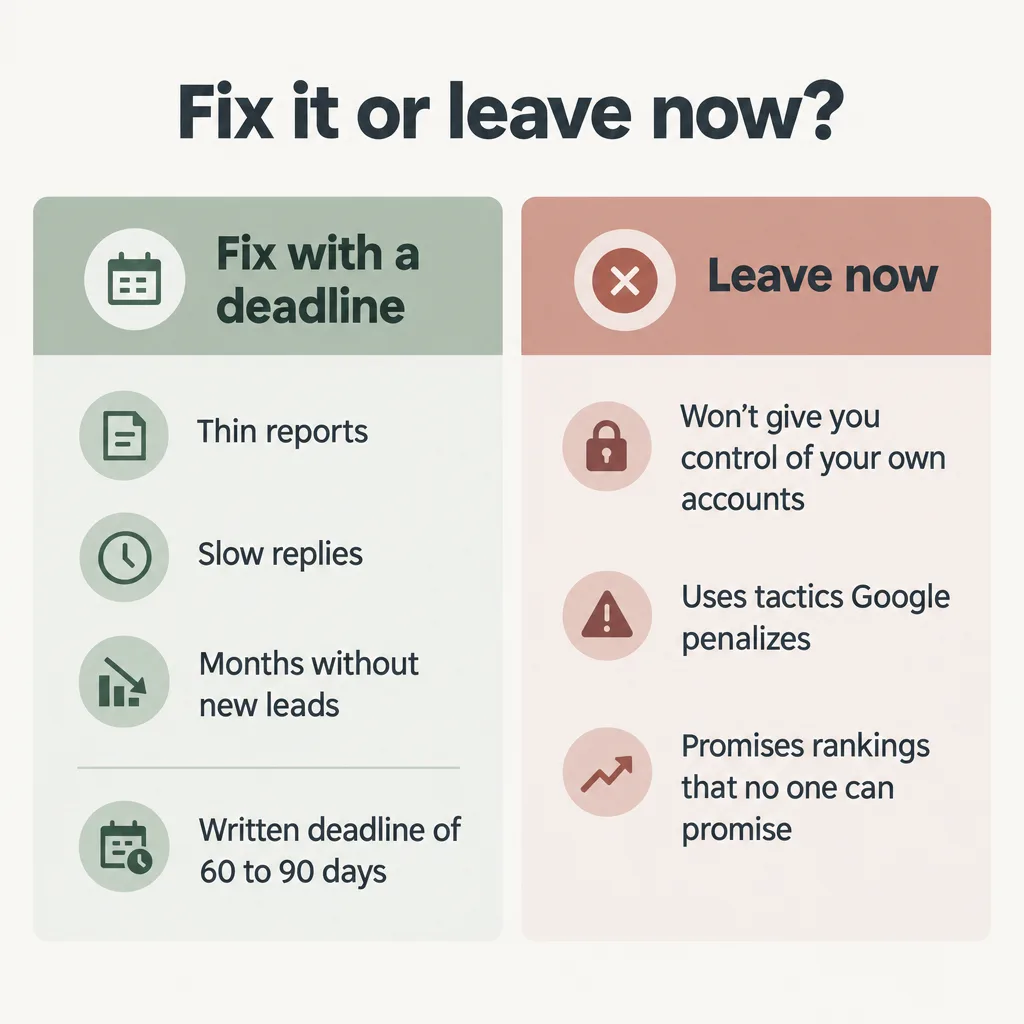
Problems to fix with a deadline
- Reports show rankings and traffic but never leads, calls, form fills, or revenue. The agency can add those numbers to the report. If traffic is up and leads aren’t, the causes are covered in why SEO traffic doesn’t always bring leads.
- Replies are slow, or meetings keep being moved.
- There is no written plan for the next few months of work.
- A new account manager has taken over and doesn’t know your business.
- Content needs heavy editing before it can be published.
- Nothing has improved after close to a year. A year is the far end of Google’s 2017 range, so the agency owes you an explanation backed by a record of the work it has done, and a written plan for what will change. If it can’t show any work at all, the problem belongs on the leave-now list.
Reasons to leave now
- It won’t hand over your accounts or add you to them. An agency that keeps your domain, analytics, or Google Business Profile out of your reach is keeping you dependent on it.
- It creates links to your site, from other websites, that Google treats as spam. Google’s spam policies count links made mainly to manipulate rankings as spam. Examples include links bought to improve rankings, links from low-quality directories, and the same link placed in the footer of many different websites.
- It guarantees rankings or claims a special relationship with Google. Google’s own guidance on hiring an SEO says “No one can guarantee a #1 ranking on Google,” and “If they guarantee you that their changes will give you first place in search results, find someone else.” The same page warns against SEOs that claim a “special relationship” with Google.
- It can’t show what it did for the money after you ask in writing. Google suggests asking an SEO before you hire it, “Will you share with me all the changes you make to my site.” An agency that bills you every month and still can’t answer that question has given you nothing to judge.
Problems on this list can’t wait for a deadline, because the consequences fall on your business rather than on the agency. Google’s hiring page says: “Ultimately, you are responsible for the actions of any companies you hire.” If an agency’s links cost your site its rankings, your business does the cleanup.
That happened to Jitbit, a small software company, in 2013, when its search traffic fell sharply. On Hacker News, Matt Cutts, then at Google, said the cause was a change Google had made to catch link spam. The links in question were “powered by” links to Jitbit at the bottom of the forum and help desk software it sold, so they appeared on its customers’ websites. That is the footer-link pattern Google’s spam policies name. Founder Alex Yumashev replied that “our SEO agency advised to add that.” He was left contacting customers “one-by-one” to change the links, and concluded, “I guess we should fire these guys.”
How do you give an SEO agency a fair last chance?
A fair last chance is a written request with a deadline, so both sides know what counts as fixed. The email or letter needs four things:
- The problems, each stated specifically.
- The evidence you expect to see by the deadline, such as a log of the changes made to your site, a report that includes leads or calls, and a written plan for the next quarter.
- The deadline, 60 to 90 days from the date you send it.
- Admin access for you. The agency adds you as an admin on every account now, using a login your business owns.
The deadline tests whether the work is being done, not whether rankings have moved. In 60 to 90 days an agency can produce a work log, change its reports, and write a plan, so that is long enough to judge how it responds. To check the evidence when it arrives, use the steps in how to tell if your SEO agency is doing the work, and compare the new reports against what an SEO report should include each month.
If the deadline passes without that evidence, leave. Keep a copy of the request. If your contract lets you end it early because the agency failed to do its job, a dated record of what you asked for will help.
What should you check in your SEO contract before giving notice?
Read the contract before you tell the agency anything, because its terms decide when you can leave, what you’ll owe, and who owns the work. These are the terms to find:
- Notice period: how far ahead you have to tell the agency you’re leaving.
- Minimum term: whether you’re still inside a committed period, such as the first six or 12 months.
- Auto-renewal: whether the contract renews by itself unless you cancel by a certain date.
- Termination for cause and cure period: many contracts let you end the agreement early if the agency fails to do what it agreed, often only after giving it a set time to fix the problem, called a cure period.
- Early exit fee: what you owe if you leave before the term ends.
- Ownership of content and the website: who owns the pages, articles, and site the agency built.
Check content ownership closely, because the agency may own the pages and articles it wrote for you. Under US copyright law, copyright belongs first to the author of a work, which for agency-written content usually means the agency. For your business to own that content, the agency generally has to sign it over to you in writing. Look for a clause in the contract that does that, usually called an assignment.
This is general information, not legal advice. If the contract is long, unclear, or carries an exit fee, have a lawyer read it before you give notice.
How do you secure your accounts before leaving an SEO agency?
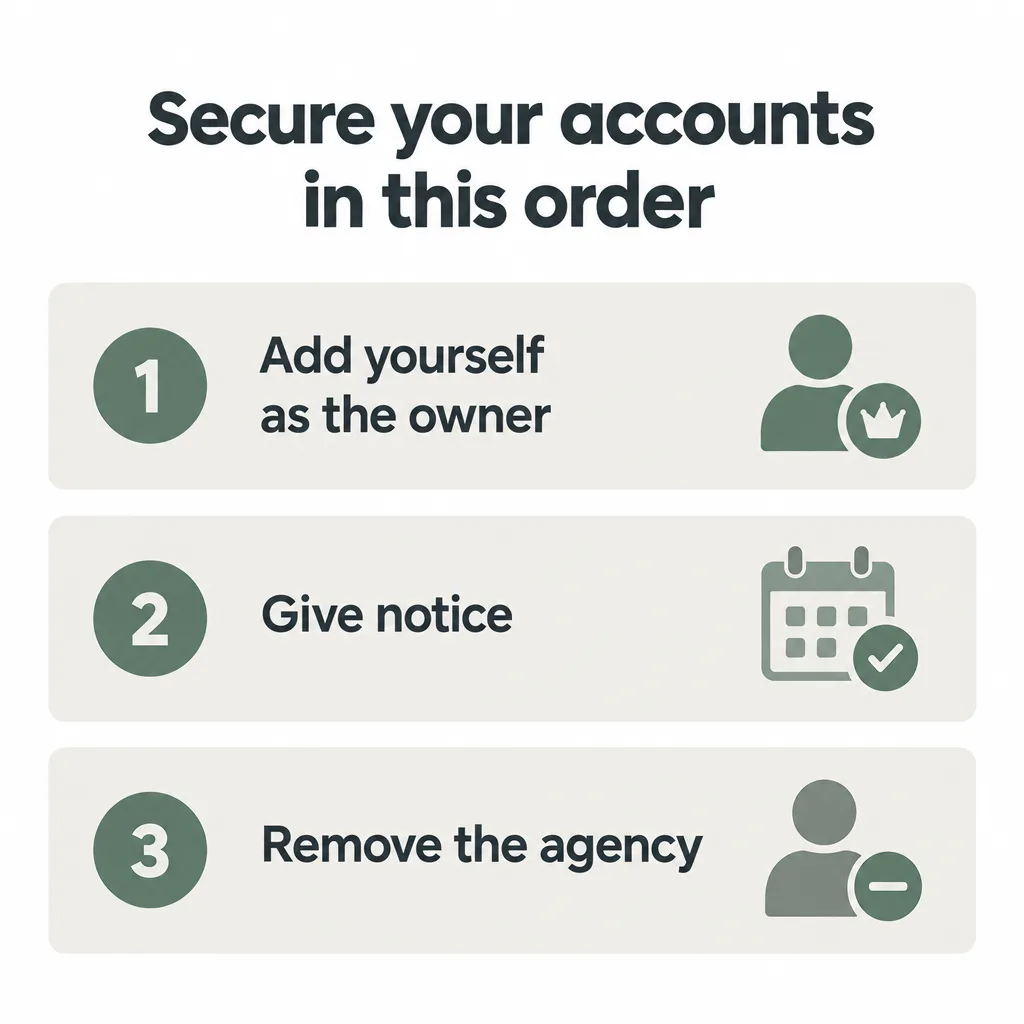
Secure your accounts in this order: add yourself as the owner of each one first, give notice second, and remove the agency last. Once an agency has been told it’s losing your business, it has less reason to help with handovers. Google Business Profile also makes a new owner wait seven days before they can remove anyone else, so the accounts need to be in your name well before you give notice.
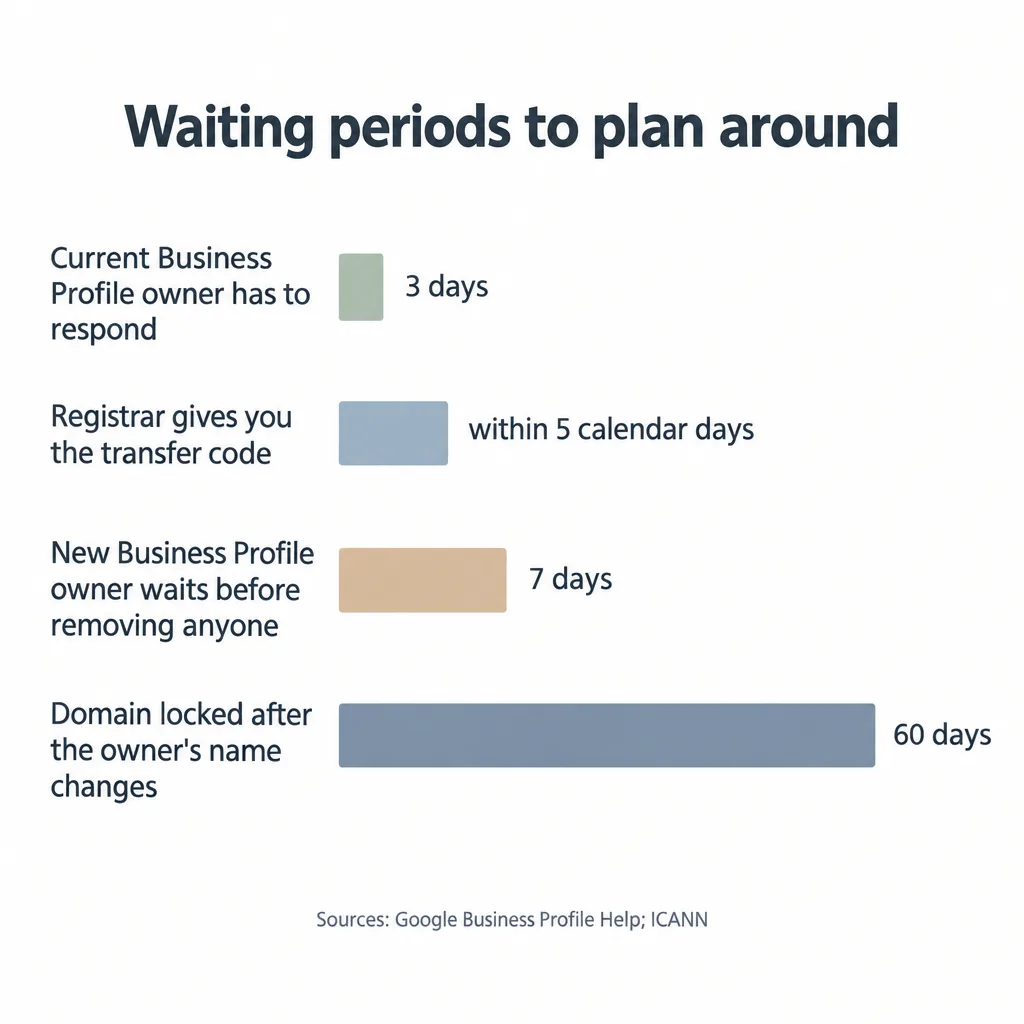
Many owners assume the agency owns the accounts because it set them up. Those accounts should all be in the business’s name: the domain, hosting, website login, Google Analytics, Search Console, and Google Business Profile. Tony Wright, who runs an agency himself, described in Search Engine Journal a small company whose former agency claimed the company’s Google Analytics account as its own after the contract ended. Google wouldn’t give the company access, so it lost all of its past analytics data and had to start again with a new account. “Every client eventually leaves their agency at some point,” Wright wrote. “If you don’t own your own data, you need to fix that right away.”
| Account | What you need | The catch |
|---|---|---|
| Domain name | Your business listed as the domain’s owner, in an account you control | Changing the owner’s name locks the domain with its current company for 60 days |
| Hosting and website login | The hosting account and admin login in your name | If the agency’s hosting ends before you move, the website goes offline |
| Google Search Console | Verified owner | The agency can regain access unless its ownership code is removed from your site |
| Google Analytics 4 | Administrator role | Moving your website’s data out of the agency’s account needs the agency’s help |
| Google Tag Manager | Admin access in your name | With no admin left, your tracking setup is deleted automatically |
| Google Business Profile | Primary owner | A new owner waits seven days before they can remove anyone or take over primary ownership |
| Google Ads | Your customer ID | Ads the agency pays for by monthly invoice stop when you leave, unless billing is changed first |
| Call tracking, content, and tracking data | The phone numbers, source files, and exports | The agency holds them, so you have to ask for each one |
Domain name
A domain’s registrar is the company it is registered through. Its registrant is the person or business it is registered to, and that should be your business.
- Look up your domain at lookup.icann.org to find its registrar.
- Log in to the registrar account and check that the registrant is your business. If the agency controls the account, ask it to move the domain into an account in your name.
- If you want to move the domain to a different registrar, ask your current registrar for the transfer code. Under the rules of ICANN, the organization that oversees domain names, it must give you the code within five calendar days.
- Make any change to the registrant name early. After that change, the domain can’t be moved to another registrar for 60 days. The website keeps working during those 60 days.
Some registrars let you opt out of the 60-day lock, but they aren’t required to.
Hosting and website login
Make sure the hosting account and the website’s admin login are in your name, with an email address your business controls. Hosting is the account that keeps the website online. If it stays in the agency’s name and the agency closes it when you leave, your website goes offline. Move hosting before the agency’s contract ends, and leave enough time for the move.
Google Search Console
Search Console is Google’s free tool showing how your site performs in Google search. Its owners have full control over who can use it. A verified owner has proved ownership by adding a short code, called a verification token, to the website or its domain settings. Whoever manages your website can add it for you. A delegated owner was added by a verified owner and has no token of its own. Become a verified owner yourself, so your access doesn’t depend on anyone else’s.
Removing an agency that is a verified owner takes two steps. First, delete every verification token it added to the site. Then remove it in Search Console under Settings, then Users and permissions. Search Console doesn’t delete tokens when it removes a user, and Google’s help page warns: “If you do not delete these tokens, the removed owner will be able to re-verify ownership if they choose to.”
Google Analytics 4
In Google Analytics 4, an account holds one or more properties, and a property holds the data for your website. You need the Administrator role, which Google describes as “Full control of Analytics,” including adding and deleting users. The Editor role sounds similar but can’t manage users, so an Editor can’t remove the agency.
If your website’s property sits inside an account the agency owns, Google lets you move it to an account you own, and “All reporting data associated with a property is moved.” Whoever does the move needs Administrator and Editor roles on both the agency’s account and yours. In practice, the agency has to grant that access or do the move itself, so ask for it before you give notice.
Google Tag Manager
Tag Manager is where many websites keep their tracking code for tools such as Google Analytics. Its accounts and containers (a container holds the tags for one website) are deleted when no one with admin rights is left. Google’s help says: “When an account or container has no admin, it will be automatically deleted.” Google support can’t add you as a user after that happens. Get admin access in your own name before the agency’s users are removed.
Google Business Profile
A Business Profile has one primary owner, and that should be you. For your first seven days as an owner, Google’s seven-day rule stops you from removing other owners or managers or taking over primary ownership, so start at least a week before you give notice. The step you take depends on who controls the profile now:
- You’re already an owner. Check under Business Profile settings, then People and access, whether you or the agency is the primary owner. If the agency is, ask it to transfer primary ownership to you.
- The agency is the primary owner and will cooperate. Ask the agency to invite you as an owner from Business Profile settings, then People and access. Once the seven days have passed, ask it to transfer primary ownership to you. The agency can’t remove itself from the profile until it has done that.
- The agency is the primary owner and won’t respond. Request access through Google. The current owner has three days to respond. If it doesn’t, you may be able to claim the profile yourself, although Google says that option “isn’t always available.” If the agency denies the request, you can appeal.
Google Ads, if the agency runs ads
Ask the agency for your Google Ads customer ID; agencies that manage ads must give it to you on request. Also ask whether it runs your ads through its manager account, an agency-level account that controls its clients’ ad accounts. Unlinking your account from the manager account keeps your history: Google says “The individual account won’t lose its own account campaign history.” Ask the agency whether it pays Google for your ads by monthly invoice through its manager account. If it does, your ads stop running when you unlink, unless the billing setup is changed before you unlink.
Call tracking, content, and tracking data
The remaining items are records the agency holds rather than accounts you log into:
- Call tracking numbers. If the agency set up tracking phone numbers on your website or listings, ask who owns them and whether they can be moved to your account, because customers may already be calling them.
- Content files. Ask for the source files of every page and article the agency wrote.
- Rank and AI search tracking. Ask for full exports of any rank tracking the agency ran, and of any record it kept of how often AI search engines such as ChatGPT mentioned your business, so the next provider has a starting point.
Ask for each of these in writing, in a format you can open, by a date before the notice period ends.
Removing the agency’s access
Once notice is given and every account is in your name, remove the agency’s users from each one and change the passwords on any login it knew. Do this last, after you’ve confirmed your own access works.
Will you lose your rankings if you fire your SEO agency?
Firing your SEO agency doesn’t have to cost you your rankings, because Google ranks your website’s pages, and those stay with you. Rankings can drop after a switch when something changes: pages get deleted, URLs change without redirects, the site goes offline because hosting lapsed, or nobody can get into the accounts to fix a problem. If any URLs do have to change, redirect each old address to its new one and, as Google advises, “keep the redirects for as long as possible, generally at least 1 year.”
The notice period carries the most risk, because the agency still controls parts of the site while it has less reason to look after them. Make sure no pages or content are taken down when the agency’s work stops. If the contract still covers work during the notice period, such as publishing content, that work should continue. Ask for a final report and a log of the work done before you make the last payment.
Does AI search change whether you should fire your SEO agency?
An agency’s lack of AI search work is, on its own, a reason to set a deadline rather than a reason to leave now. People now also ask AI search engines such as ChatGPT and Google’s AI Mode for answers and recommendations. Ranking in Google’s results, being cited in those answers, and being recommended in them are three different things. Your site is cited when an AI answer uses it as a source. Your business is recommended when the answer names it as the one to choose. An agency that only works toward Google rankings, with nothing aimed at getting your business cited or recommended in those answers, is doing what findanseoagency.com calls legacy SEO.
The same agency can start working toward citations and recommendations, because AI search is part of SEO rather than a separate service. Google says “The best practices for SEO remain relevant for AI features in Google Search” and that there are no additional requirements to appear in AI Overviews or AI Mode. Add AI search to your written request: what the agency will do to get your business cited and recommended, which questions it will regularly ask AI search engines to check whether your business appears, and how it will report the results. How businesses get named in AI answers is covered in how to get recommended by AI search.
What to do after you fire your SEO agency
Once the accounts are yours and notice is given, the next decision is who does the work, and the answer doesn’t have to be another agency. A freelancer, an in-house hire, or doing it yourself can each make sense, and an agency compared with a freelancer or in-house hire sets out which suits which business. Some businesses find they can do SEO without an agency for a while. If you do hire another agency, the questions to ask before you sign include who will own the accounts, the content, and the site, so the next exit is easier than this one.
Whoever you choose, keep every account in your business’s name and give the new provider user access rather than ownership. findanseoagency.com’s strategy guides cover the rest of choosing, judging, and working with an SEO agency.